
Join us at FabCon Atlanta from March 16 - 20, 2026, for the ultimate Fabric, Power BI, AI and SQL community-led event. Save $200 with code FABCOMM.
Register now!Get Fabric Certified for FREE during Fabric Data Days. Don't miss your chance! Request now
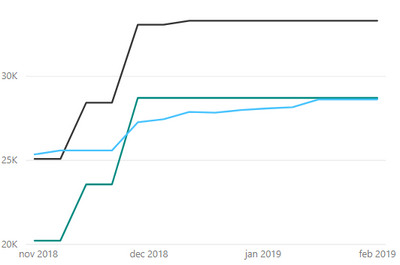
I'm creating a line chart with multiple values that show data from one project. There is a filter that selects a project and the values from that project are loaded into the chart (see below for chart and example data). I want the min and max of the x-axis of the chart always start and end with the values in the second table (ProjectStartDate and ProjectEndDate). Is this possible in Power BI?
Thank you in advance.
Hi @Anonymous,
We can use a measure like below in this scenario. Please give it a try. I assume there are three tables and proper relationships.
Demo Measure = IF ( MIN ( 'calendar'[date] ) < MIN ( 'project'[ProjectStartDate] ) || MIN ( 'calendar'[date] ) > MIN ( 'project'[ProjectEndDate] ), BLANK (), SUM ( 'projectDetails'[Baseline] ) )
Best Regards,
Hi @v-jiascu-msft,
Thank you for your response.
I understand that I can make a measure for the minimum and maximum.
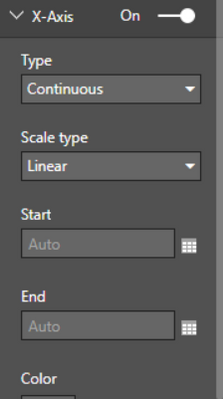
But how can I apply this on the line-chart? I can't drag and drop a measure onto the property 'Start' or 'End' (see below).
Hi @Anonymous,
I am facing a similar challenge with some charts I am currently working on - just wondering were you ever able to resolve the issue about how to apply the measure against the line-chart with being able to drag and drop a measure onto the property 'Start' or 'End'?
Thanks,
Christine
Hi @Anonymous,
I would suggest you use a measure instead. If you set the property "Start" or "End", you can't make it dynamic.
Best Regards,
Check out the November 2025 Power BI update to learn about new features.
Advance your Data & AI career with 50 days of live learning, contests, hands-on challenges, study groups & certifications and more!