
cancel
Showing results for 
Search instead for 
Did you mean: 

We've captured the moments from FabCon & SQLCon that everyone is talking about, and we are bringing them to the community, live and on-demand. Starts on April 14th. Register now

Reply
niel_orvyn1
Helper III
Helper III

Using a Visuals data as slicer

Hi there, 


I'm trying to figure out how I can use the output on visual as a splicer. 


Below you will see different names (user id). The graphs already has a relation so it filters all the users accoring to a certian reason, when clicking on one of the bards.


Then I use the filter fuction by using TopN on the desktop option, get the top 10 users effected by the reaons. 


Annotation 2020-05-27 100026.png


However, not that I have the top 10 names affected by the reason I want to use the top 10 names to use as a slicer so I can drill down into each of the top 10 users individually. 


Any ideas? Maybe missing a best practice? 


Thanks


4 REPLIES 4
Anonymous
Not applicable

@niel_orvyn1 

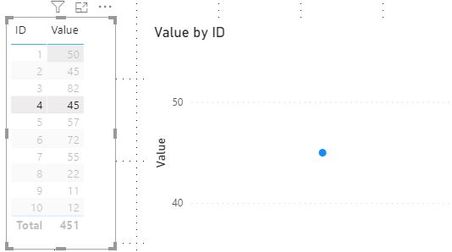
As far as I know, you can not make the table visual works as a slicer to filter a bar chart.

As an alternative, you may use a line chart instead, when select a role on the table visual the line graph will be filtered and drill down to the selected category only.


table slicer.JPG


Paul Zheng _ Community Support Team
If this post helps, then please consider Accept it as the solution to help the other members find it more quickly.

Hi @Anonymous - thanks for the below. Yes I figured that you cannot make the table visual work as a filter after many hours😀. But thanks for the below, I will give it a go in future. 


I managed to complete my report by using the button (ctrl+click) to next page after selection data (a bar) and this was good enough for now. 


Many thanks for you time in giving the suggetion. 


Best Regards

@amitchandak 

Many thanks for the links, it was very usefull and very well presented (very clear), and helped a great deal on my learning curve. 

However, I could not use it as my solution, I ended up using the drill through option with buttons. 


Best regards,

Niel

Helpful resources

Announcements
New to Fabric survey Carousel

New to Fabric Survey

If you have recently started exploring Fabric, we'd love to hear how it's going. Your feedback can help with product improvements.

Power BI DataViz World Championships carousel

Power BI DataViz World Championships - June 2026

A new Power BI DataViz World Championship is coming this June! Don't miss out on submitting your entry.

Join our Fabric User Panel

Join our Fabric User Panel

Share feedback directly with Fabric product managers, participate in targeted research studies and influence the Fabric roadmap.