cancel
Showing results for 
Search instead for 
Did you mean: 

The FabCon + SQLCon recap series starts April 14th at 8am Pacific. If you’re tracking where AI is going inside Fabric, this first session is a can't miss. Register now

Reply
bpontius
Frequent Visitor

Changing excel file data source/location

I set up a report drawing data from a database and a couple Excel files using PowerBI desktop and published to PowerBI Online with hopes of other users being able to refresh/update the data. Due to the fact that the Excel file was on my personal computer they were unable to do so. 

After a bit of research it looks like multiple users should be able to refresh and see up-to-date information if the Excel files are hosted on our team's Sharepoint (as outlined here). Two questions regarding this, if anyone has the answer: 


  1. Will this enable users who have access to the Sharepoint to refresh the data in PowerBI?
  2. If yes to question 1, how do I go about changing the location that my current dashboard's dataset is looking to for the Excel files? I've uploaded them to a Sharepoint folder but can't figure out how to redirect PowerBI to grab the data there rather than the files on my own computer. I'd rather not delete and re-create the connections since then I would lose a significant number of calculated columns and measures that I've created. 

Any help would be greatly appreciated! 

- Ben 

1 ACCEPTED SOLUTION
Anonymous
Not applicable

Hi @bpontius,


>>Will this enable users who have access to the Sharepoint to refresh the data in PowerBI?

I'm not so clear for your description, but if you direct connect to sharepoint team site files, it will use sharepoint to manage the refresh without gateway. (For this mode, you cannot use this file as the source of tiles.)


For #2, if you want to import sharepoint site files to power bi, you can refer to below steps:

1. Navigate and open the excel file.

2. Click the 'Edit Workbook' -> 'Edit in Excel'.

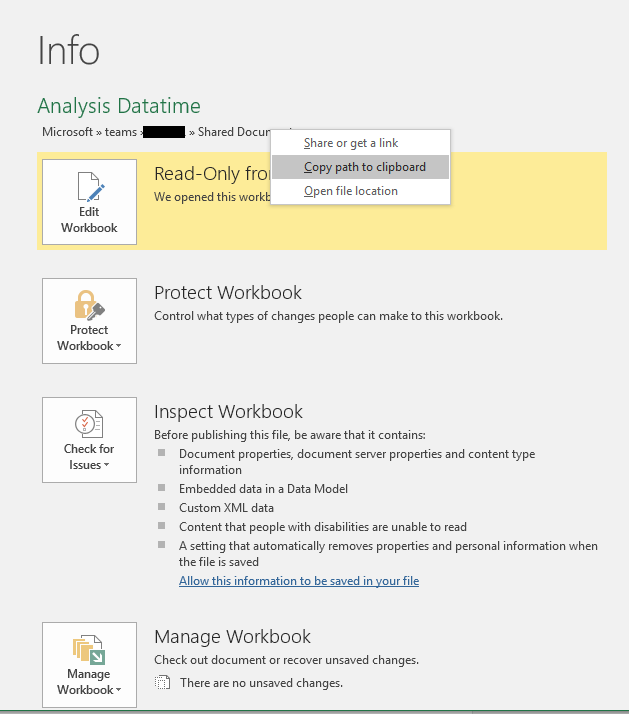
3. Copy the path to clipboard.

File - > InfoFile - > Info

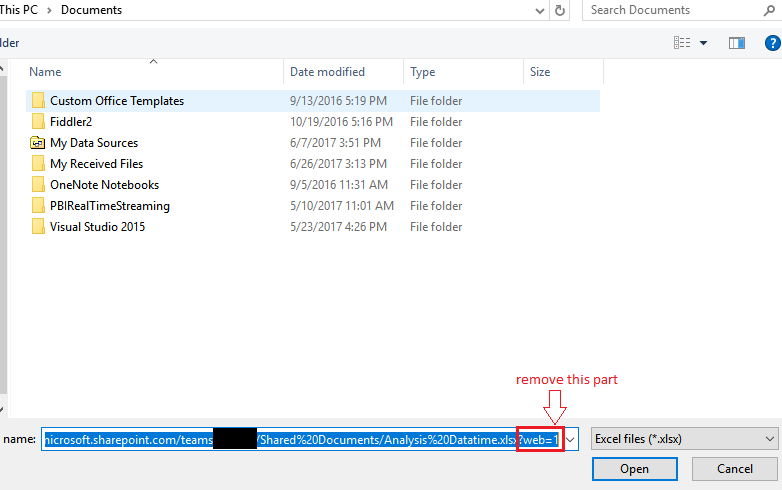
4. Open the import dialog and paste the url, then remove "?web=1" and select the 'copy data' mode to finish the operation.('Import' - > 'workbook')

2.PNG


After you finish and publish to service, this dataset will use connect to sharepoint with 'connect direct' mode.

3.PNG


Regards,

Xiaoxin Sheng

View solution in original post

4 REPLIES 4
Anonymous
Not applicable

Hi @bpontius,


>>Will this enable users who have access to the Sharepoint to refresh the data in PowerBI?

I'm not so clear for your description, but if you direct connect to sharepoint team site files, it will use sharepoint to manage the refresh without gateway. (For this mode, you cannot use this file as the source of tiles.)


For #2, if you want to import sharepoint site files to power bi, you can refer to below steps:

1. Navigate and open the excel file.

2. Click the 'Edit Workbook' -> 'Edit in Excel'.

3. Copy the path to clipboard.

File - > InfoFile - > Info

4. Open the import dialog and paste the url, then remove "?web=1" and select the 'copy data' mode to finish the operation.('Import' - > 'workbook')

2.PNG


After you finish and publish to service, this dataset will use connect to sharepoint with 'connect direct' mode.

3.PNG


Regards,

Xiaoxin Sheng

Hello,


I'm in the same situation, but am not allowed to connect my local Excel / Power BI to the sharepoint server due to MFA and security settings on my laptop.

Is it possible as well to update the source location AFTER publication, i.e. in the online version of Power BI?


Thanks,


Wim

Thank you Xiaoxin! That helped a lot!

Best Regards,

Chris


dtartaglia
Resolver I
Resolver I

I cannot answer #1, I do not use Sharepoint. If no one else has the answer just test it. #2 I open the QueryEditor, Click Advanced Editor in the Query pane and change the path/location to the files here.

Helpful resources

Announcements
New to Fabric survey Carousel

New to Fabric Survey

If you have recently started exploring Fabric, we'd love to hear how it's going. Your feedback can help with product improvements.

Power BI DataViz World Championships carousel

Power BI DataViz World Championships - June 2026

A new Power BI DataViz World Championship is coming this June! Don't miss out on submitting your entry.

Join our Fabric User Panel

Join our Fabric User Panel

Share feedback directly with Fabric product managers, participate in targeted research studies and influence the Fabric roadmap.

March Power BI Update Carousel

Power BI Community Update - March 2026

Check out the March 2026 Power BI update to learn about new features.