cancel
Showing results for 
Search instead for 
Did you mean: 

Learn from the best! Meet the four finalists headed to the FINALS of the Power BI Dataviz World Championships! Register now

Reply
hejszyszki
Frequent Visitor

Changing average using slicer

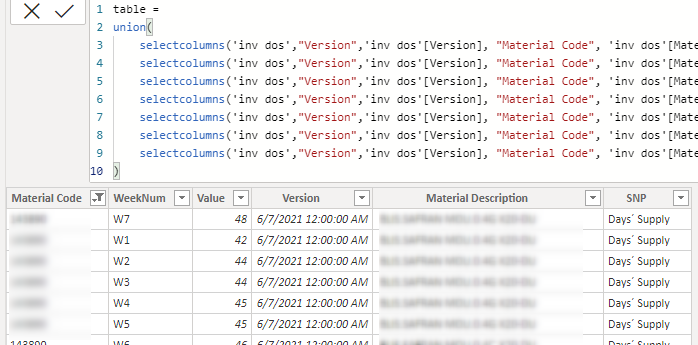
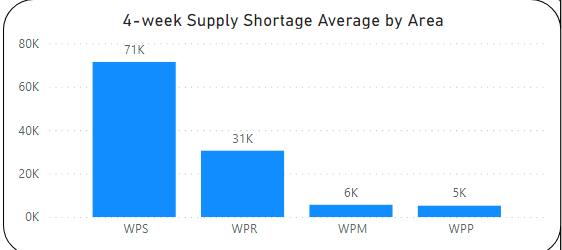
Hi! Below i have a graph, made of measure below which shows 4-w Average. (Material code has relationship with area in another table to be clear).  Structure of table is also shown below. Weeks are like from 1 to 78 (W1 - W78). What i would like to accomplish is to make slicer(with slider/zip) that shows range from W1 to last Week and once you pick certain range like W2-W8 it shows average of W2-W8. 
Does anyone have any idea how to do it? Is it even possible to do :)?

Thanks in advance!
199091592_491481125412041_8221514887290435912_n.png198580490_935635920565673_1152340856391878712_n.png199466621_3109692912691200_7067065510021724340_n.png

1 ACCEPTED SOLUTION

@hejszyszki 

You need to create another column in this table to extract the week number.

WeekNumber = INT(SUBSTITUTE(Table12[WeekNum],"W",""))

Then, you can use below measure and make sure you have slicer on the WeekNumber to select the range:

measure =
VAR __minweekno =
    MIN ( 'invo dos'[WeekNumber] )
VAR __maxnweekno =
    MAX ( 'invo dos'[WeekNumber] )
RETURN
    SUMX (
        FILTER (
            'invo dos',
            'invo dos'[SNP Plan] = "Short Supply"
                && 'invo dos'[WeekNumber] >= __minweekno
                && 'invo dos'[WeekNumber] <= __maxnweeknow
        ),
        'invo dos'[Value]
    )


Note: If your data expands into more than one year then you will have to add (Year + weekNumber )

Did I answer your question? Mark my post as a solution! and hit thumbs up


Subscribe and learn Power BI from these videos

Website LinkedIn PBI User Group

View solution in original post

3 REPLIES 3
Fowmy
Super User
Super User

@hejszyszki 
The best approach to your problem is to unpivot your Weeks into two columns as follows

Material Code, Desc, SNP Plan, Week, Value

Refer to these videos on UnPivot: https://www.youtube.com/watch?v=Vff2kRBM95o&t=0s 


Did I answer your question? Mark my post as a solution! and hit thumbs up


Subscribe and learn Power BI from these videos

Website LinkedIn PBI User Group

Ended up with something like this. Stuck when trying to create slicer of average of picked range.199722191_3088268814736288_7403646327527955132_n.png
Thanks in advance!

@hejszyszki 

You need to create another column in this table to extract the week number.

WeekNumber = INT(SUBSTITUTE(Table12[WeekNum],"W",""))

Then, you can use below measure and make sure you have slicer on the WeekNumber to select the range:

measure =
VAR __minweekno =
    MIN ( 'invo dos'[WeekNumber] )
VAR __maxnweekno =
    MAX ( 'invo dos'[WeekNumber] )
RETURN
    SUMX (
        FILTER (
            'invo dos',
            'invo dos'[SNP Plan] = "Short Supply"
                && 'invo dos'[WeekNumber] >= __minweekno
                && 'invo dos'[WeekNumber] <= __maxnweeknow
        ),
        'invo dos'[Value]
    )


Note: If your data expands into more than one year then you will have to add (Year + weekNumber )

Did I answer your question? Mark my post as a solution! and hit thumbs up


Subscribe and learn Power BI from these videos

Website LinkedIn PBI User Group

Helpful resources

Announcements
Join our Fabric User Panel

Join our Fabric User Panel

Share feedback directly with Fabric product managers, participate in targeted research studies and influence the Fabric roadmap.

March Power BI Update Carousel

Power BI Community Update - March 2026

Check out the March 2026 Power BI update to learn about new features.