Learn from the best! Meet the four finalists headed to the FINALS of the Power BI Dataviz World Championships! Register now
Hi,
I am trying to display card visuals in a 65'' TV. The current maximum Font size is 60 and I was wondering is there is a way to increase this limit?
Thanks
Solved! Go to Solution.
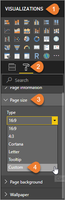
Try setting the page view setting to Fit to Width:
The first set of Page view settings controls the display of your report page relative to the browser window. Choose between:
https://docs.microsoft.com/en-us/power-bi/power-bi-report-display-settings#page-view-settings
Hey @Anonymous,
it seems that you are not able to do it.
Would it be solution to tweak the page size/resolution?
If this post was helpful may I ask you to mark it as solution and give it a 'thumbs up'? This will also help others
Have a nice day!
BR,
Josef
Graz - Austria
@JosefPrakljacic Thanks for the response.
Unfortunatly the suggested solution does not increase the text size!
Try setting the page view setting to Fit to Width:
The first set of Page view settings controls the display of your report page relative to the browser window. Choose between:
https://docs.microsoft.com/en-us/power-bi/power-bi-report-display-settings#page-view-settings
A new Power BI DataViz World Championship is coming this June! Don't miss out on submitting your entry.
Share feedback directly with Fabric product managers, participate in targeted research studies and influence the Fabric roadmap.
| User | Count |
|---|---|
| 46 | |
| 34 | |
| 27 | |
| 15 | |
| 15 |
| User | Count |
|---|---|
| 59 | |
| 58 | |
| 39 | |
| 22 | |
| 20 |