cancel
Showing results for 
Search instead for 
Did you mean: 

Vote for your favorite vizzies from the Power BI Dataviz World Championship submissions. Vote now!

Reply
Anonymous
Not applicable

Changing Maximum Font Size

Hi,


I am trying to display card visuals in a 65'' TV. The current maximum Font size is 60 and I was wondering is there is a way to increase this limit?

                                                    Font Size.PNG

Thanks

1 ACCEPTED SOLUTION

Try setting the page view setting to Fit to Width:


Page view settings

The first set of Page view settings controls the display of your report page relative to the browser window. Choose between:

  • Fit to page (default): Contents are scaled to best fit the page
  • Fit to width: Contents are scaled to fit within the width of the page

https://docs.microsoft.com/en-us/power-bi/power-bi-report-display-settings#page-view-settings

View solution in original post

3 REPLIES 3
JosefPrakljacic
Solution Sage
Solution Sage

Hey @Anonymous,


it seems that you are not able to do it.


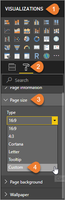
Would it be solution to tweak the page size/resolution?


2-Choose-Custom-Page-Size-from-the-Format-menu.png


If this post was helpful may I ask you to mark it as solution and give it a 'thumbs up'? This will also help others

Have a nice day!

BR,
Josef
Graz - Austria

Anonymous
Not applicable

@JosefPrakljacic Thanks for the response.


Unfortunatly the suggested solution does not increase the text size! 

Try setting the page view setting to Fit to Width:


Page view settings

The first set of Page view settings controls the display of your report page relative to the browser window. Choose between:

  • Fit to page (default): Contents are scaled to best fit the page
  • Fit to width: Contents are scaled to fit within the width of the page

https://docs.microsoft.com/en-us/power-bi/power-bi-report-display-settings#page-view-settings

Helpful resources

Announcements
Power BI DataViz World Championships

Power BI Dataviz World Championships

Vote for your favorite vizzies from the Power BI World Championship submissions!

Sticker Challenge 2026 Carousel

Join our Community Sticker Challenge 2026

If you love stickers, then you will definitely want to check out our Community Sticker Challenge!

January Power BI Update Carousel

Power BI Monthly Update - January 2026

Check out the January 2026 Power BI update to learn about new features.

FabCon Atlanta 2026 carousel

FabCon Atlanta 2026

Join us at FabCon Atlanta, March 16-20, for the ultimate Fabric, Power BI, AI and SQL community-led event. Save $200 with code FABCOMM.