Join us at FabCon Atlanta from March 16 - 20, 2026, for the ultimate Fabric, Power BI, AI and SQL community-led event. Save $200 with code FABCOMM.
Register now!Learn from the best! Meet the four finalists headed to the FINALS of the Power BI Dataviz World Championships! Register now
Hi guys. I had to change my project's data source, but changing the data source the Sample File parameter gets lost.
A Sample File is being used as I am importing excel spreadsheets into Power BI located in a specific folder.
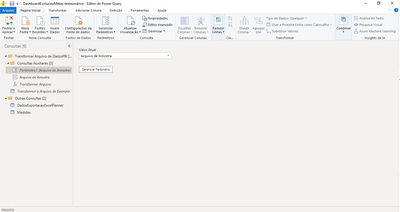
1. Before change:
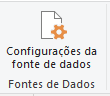
2. I access Data source configuration and changed the folder path:
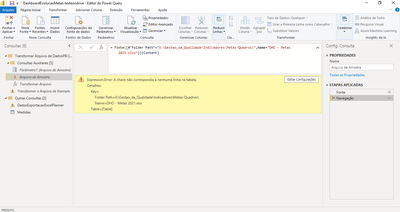
3. After change:
3. Even I change the folder path the error continue:
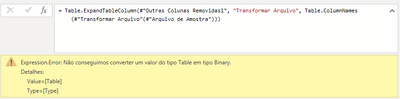
4. The error below appears when I click on Transform Sample File (1):
Thank you so much.
Solved! Go to Solution.
I guess you are using combine and load option and the query containing Parameter is getting created by that.
If Yes - chnage the path in source step of your original query as well
If this post helps, then please consider Accept it as the solution and give it a thumbs up
I guess you are using combine and load option and the query containing Parameter is getting created by that.
If Yes - chnage the path in source step of your original query as well
If this post helps, then please consider Accept it as the solution and give it a thumbs up
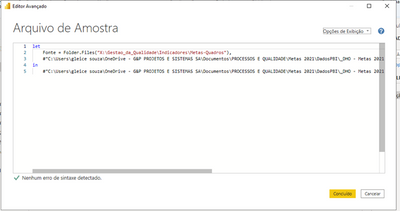
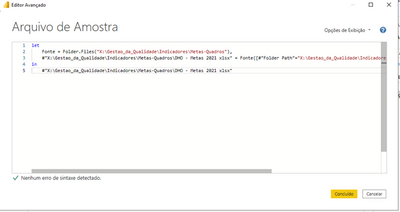
I fixed the error acessing Advanced Editor and changing the path to source folder.
Before:
After:
Thank you for answer me.
Share feedback directly with Fabric product managers, participate in targeted research studies and influence the Fabric roadmap.
Check out the February 2026 Power BI update to learn about new features.
| User | Count |
|---|---|
| 61 | |
| 54 | |
| 41 | |
| 17 | |
| 13 |
| User | Count |
|---|---|
| 106 | |
| 99 | |
| 38 | |
| 29 | |
| 28 |