cancel
Showing results for 
Search instead for 
Did you mean: 

The Power BI Data Visualization World Championships is back! Get ahead of the game and start preparing now! Learn more

Reply
Chris-VA
Regular Visitor

Change dates in Bar Graph

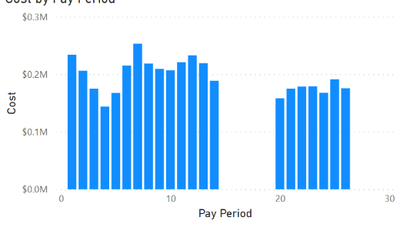
Within my organization, we have pay periods that start at 20, go to 26 and then start at 1 to 19 to end the year.  When creating a bar graph it normally will start at 1 and then go to 26.  I am trying to find out how to have it start at pp 20 then go to 26 and then 1 through 19.  Any ideas on how to change this to reflect in graphs?


Here is an example of what I see:


ChrisVA_0-1660240587560.png


1 ACCEPTED SOLUTION
lbendlin
Super User
Super User

try this - add another column with the right order


20 =1

21 =2

22 =3

...

26 = 5

1 = 6

2 = 7


etc.


Then use the "Sort a column by another column" feature.

View solution in original post

2 REPLIES 2
Chris-VA
Regular Visitor

Perfect, appreciate the help.


lbendlin
Super User
Super User

try this - add another column with the right order


20 =1

21 =2

22 =3

...

26 = 5

1 = 6

2 = 7


etc.


Then use the "Sort a column by another column" feature.

Helpful resources

Announcements
Power BI DataViz World Championships

Power BI Dataviz World Championships

The Power BI Data Visualization World Championships is back! Get ahead of the game and start preparing now!

December 2025 Power BI Update Carousel

Power BI Monthly Update - December 2025

Check out the December 2025 Power BI Holiday Recap!

FabCon Atlanta 2026 carousel

FabCon Atlanta 2026

Join us at FabCon Atlanta, March 16-20, for the ultimate Fabric, Power BI, AI and SQL community-led event. Save $200 with code FABCOMM.