Get certified for free when you join Fabric Data Days 2026 and dive into Fabric, Power BI, SQL, AI, and other essential data skills.
Join nowJuly 28 - August 9 | Final Round of the Power BI Dataviz World Championships. This is your chance. Learn more
Hi,
I have a report with a data source from a MySQL server. Recently, I have migrated the data to a SQL Server 2014 and I don't know how to change the data source for Power BI without mess up the current file.
How can I do this?
Thanks in advance.
Solved! Go to Solution.
Hi @dbravo
An option to achieve this consists you need to change some code in "Advance Editor" inside Power Query.
On the ribbon: View --> Advance Editor
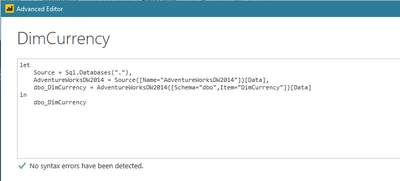
The window is similar to...
Here you can write your new SQL source.
I hope this helps
Regards
BILASolution
Hi @dbravo
An option to achieve this consists you need to change some code in "Advance Editor" inside Power Query.
On the ribbon: View --> Advance Editor
The window is similar to...
Here you can write your new SQL source.
I hope this helps
Regards
BILASolution
Hello,
Do we have to chnage the source for all the tables in advance editor?
or do we have any option to update this in bulk.
Thanks,
Nusrath
If you love stickers, then you will definitely want to check out our community sticker challenge, Barcelona edition!
Check out the July 2026 Power BI update to learn about new features.
| User | Count |
|---|---|
| 28 | |
| 28 | |
| 19 | |
| 19 | |
| 19 |
| User | Count |
|---|---|
| 37 | |
| 29 | |
| 18 | |
| 17 | |
| 15 |