Share feedback directly with Fabric product managers, participate in targeted research studies and influence the Fabric roadmap.
Sign up nowGet Fabric certified for FREE! Don't miss your chance! Learn more
Hi all,
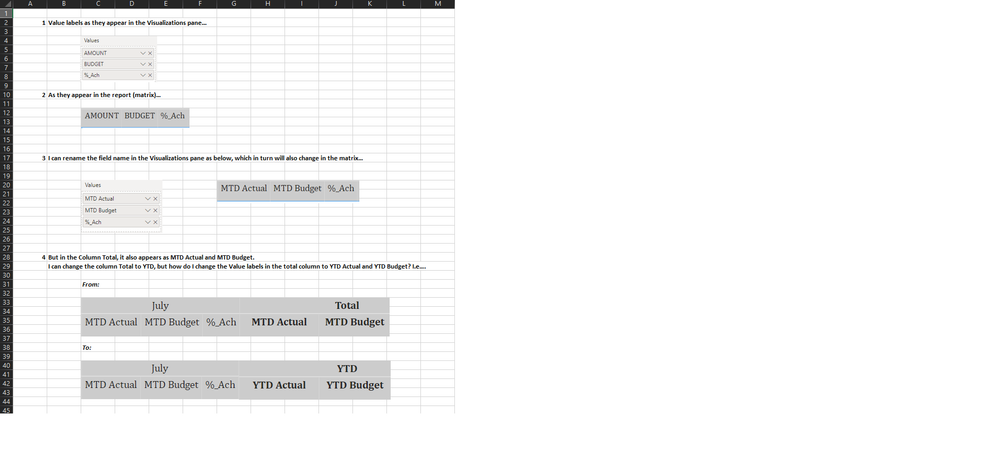
I would like to change the labels on values field names in the Totals column.
Attached below is an explanation with screen shots.
Is this possible? If so, kindly assist.
Kind regards,
Mirithu.
Solved! Go to Solution.
Hi @Mirithu ,
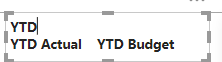
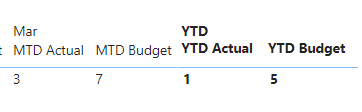
As @vanessafvg said, it can't be changed by default. As a workaroud, you can insert a text box like below.
Put it in front of the total column to cover the original data.
I attach my sample below for reference.
Best Regards,
Community Support Team _ kalyj
If this post helps, then please consider Accept it as the solution to help the other members find it more quickly.
Hi @Mirithu ,
As @vanessafvg said, it can't be changed by default. As a workaroud, you can insert a text box like below.
Put it in front of the total column to cover the original data.
I attach my sample below for reference.
Best Regards,
Community Support Team _ kalyj
If this post helps, then please consider Accept it as the solution to help the other members find it more quickly.
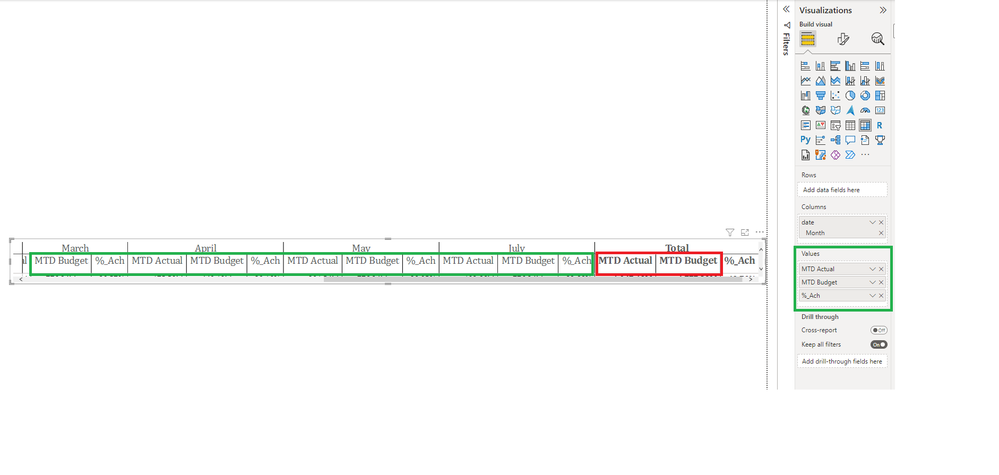
finding this a bit confusing, please rather show how you have this in power bi than an excel screen shot, pointing to the actual issue in power bi.
Proud to be a Super User!
I don't think its possible after all that is the name of the measure, it doesn't change because its a total
Proud to be a Super User!
If you love stickers, then you will definitely want to check out our Community Sticker Challenge!
Check out the January 2026 Power BI update to learn about new features.
| User | Count |
|---|---|
| 62 | |
| 58 | |
| 45 | |
| 21 | |
| 18 |
| User | Count |
|---|---|
| 121 | |
| 116 | |
| 37 | |
| 34 | |
| 30 |