cancel
Showing results for 
Search instead for 
Did you mean: 

The Power BI Data Visualization World Championships is back! Get ahead of the game and start preparing now! Learn more

Reply
KatieH
Advocate IV
Advocate IV

Change Structure of Table to be Cumulative

Hi all,


Looking for a bit of help on how to achieve this. I have a data table of clients with two separate amounts showing sales and waste per quarter as shown here:

Client NameQuarterSoldWaste
Group ABCQ1102
Group ABCQ2153
Group ABCQ351
Group ABCQ48

4


I would like to amend the table so that it shows the cumlative number for each quarter (so Q2 = Q2 + Q1, Q3 = Q3 + Q2 + Q1 etc.) like this:

Client NameQuarterSoldWaste
Group ABCQ1102
Group ABCQ2255
Group ABCQ3306
Group ABCQ438

10


Ideally I would like this to be done in the dataset itself rather than using measures etc. due to the way the rest of the report is formatted. Can anyone advise what steps I'd need to take to achieve this?

1 ACCEPTED SOLUTION

@KatieH 

you can modify the DAX


sold2 = sumx(FILTER('Table','Table'[Client Name]=earlier('Table'[Client Name])&&'Table'[Quarter]<=EARLIER('Table'[Quarter])),'Table'[Sold])


Did I answer your question? Mark my post as a solution!

Proud to be a Super User!


View solution in original post

5 REPLIES 5
ryan_mayu
Super User
Super User

@KatieH 

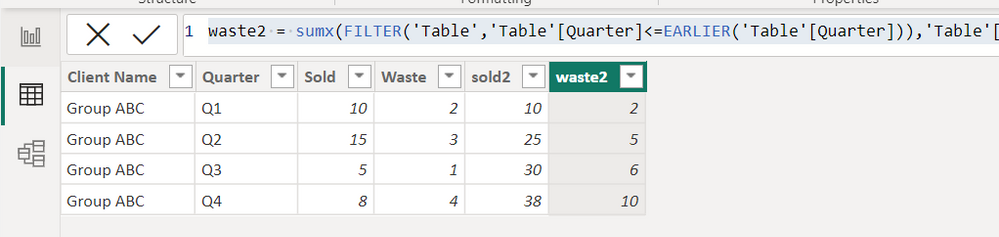
is this what you want?

sold2 = sumx(FILTER('Table','Table'[Quarter]<=EARLIER('Table'[Quarter])),'Table'[Sold])

waste2 = sumx(FILTER('Table','Table'[Quarter]<=EARLIER('Table'[Quarter])),'Table'[Waste])

1.PNG


Did I answer your question? Mark my post as a solution!

Proud to be a Super User!


Hi @ryan_mayu 

That's almost what I want but that is summing everything in the table and there are numerous different groups. Is there a way I can make it sum by each particular group?

@KatieH 

you can modify the DAX


sold2 = sumx(FILTER('Table','Table'[Client Name]=earlier('Table'[Client Name])&&'Table'[Quarter]<=EARLIER('Table'[Quarter])),'Table'[Sold])


Did I answer your question? Mark my post as a solution!

Proud to be a Super User!


Fantastic - thank you @ryan_mayu!

you are welcome


Did I answer your question? Mark my post as a solution!

Proud to be a Super User!


Helpful resources

Announcements
Power BI DataViz World Championships

Power BI Dataviz World Championships

The Power BI Data Visualization World Championships is back! Get ahead of the game and start preparing now!

November Power BI Update Carousel

Power BI Monthly Update - November 2025

Check out the November 2025 Power BI update to learn about new features.

FabCon Atlanta 2026 carousel

FabCon Atlanta 2026

Join us at FabCon Atlanta, March 16-20, for the ultimate Fabric, Power BI, AI and SQL community-led event. Save $200 with code FABCOMM.