cancel
Showing results for 
Search instead for 
Did you mean: 

The Power BI Data Visualization World Championships is back! Get ahead of the game and start preparing now! Learn more

Reply
seanpratt
Helper III
Helper III

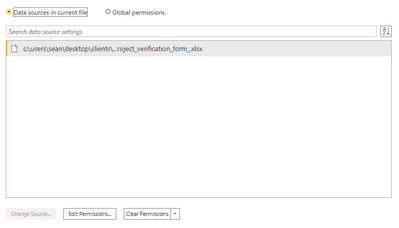
Change Source Unavailable for Excel File

Oh lord, what have I done? I created a Power BI dashboard using a long excel file for survey responses. However, I only used the data to connect to and built my dozens of measures within Power BI and not in a PowerPivot. Now, I want to send my finished dashboard and Excel file to my colleague and say "Here's what to do, every month update the Excel file and click refresh blah blah". However, part of this speech I give to colleagues or clients includes the classic "Change the source by doing this..." 

However with this dashboard I don't have that option! Why does this happen and what can I do to resolve this? I'm worried I may have to recreate the dashboard again but then still unsure on how to prevent this from happening again.


Any support on how to save this dashboard and allow for data source changing woCapture.PNGuld be gratefully received!

6 REPLIES 6
Anonymous
Not applicable

Hi @seanpratt ,


Please refer to this topic and see if it helps.

https://community.powerbi.com/t5/Desktop/Change-Data-Source-Not-Working/td-p/337800.


Best Regards,

Jay

Community Support Team _ Jay Wang

If this post helps, then please consider Accept it as the solution to help the other members find it more quickly.

Greg_Deckler
Community Champion
Community Champion

Worst case you should be able to use the Query Editor to just change the Source step either through the gear icon or Advanced Editor.


Follow on LinkedIn
@ me in replies or I'll lose your thread!!!
Instead of a Kudo, please vote for this idea
Become an expert!: Enterprise DNA
External Tools: MSHGQM
YouTube Channel!: Microsoft Hates Greg
Latest book!:
DAX For Humans

DAX is easy, CALCULATE makes DAX hard...

The icon doesn't exist beside 'Source' (again never seen that) and I instructed my colleague to use the Advanced Editor trick and he claimed it didn't work. 

Any other suggestions, or maybe tips on why this happens so I can avoid it happening again?


Any way that you could copy and paste the code from Advanced Editor? Or are you not allowed in Advanced Editor?


Follow on LinkedIn
@ me in replies or I'll lose your thread!!!
Instead of a Kudo, please vote for this idea
Become an expert!: Enterprise DNA
External Tools: MSHGQM
YouTube Channel!: Microsoft Hates Greg
Latest book!:
DAX For Humans

DAX is easy, CALCULATE makes DAX hard...

Here's the snippet for just the beginning. Let me know if the whole thing is more useful for troubleshooting


Source = Excel.Workbook(File.Contents("C:\Users\Sean\Desktop\Clients\Eguide\Community_Project_Verification_Form_.xlsx"), null, true){[Name="Table2"]}[Data]

@seanpratt , Please refer:https://community.powerbi.com/t5/Community-Blog/Why-can-t-I-change-the-Data-Source-in-Power-BI-disab...


if you need more help make me @

Appreciate your Kudos.

Share with Power BI Enthusiasts: Full Power BI Video (20 Hours) YouTube
Microsoft Fabric Series 60+ Videos YouTube
Microsoft Fabric Hindi End to End YouTube

Helpful resources

Announcements
Power BI DataViz World Championships

Power BI Dataviz World Championships

The Power BI Data Visualization World Championships is back! Get ahead of the game and start preparing now!

December 2025 Power BI Update Carousel

Power BI Monthly Update - December 2025

Check out the December 2025 Power BI Holiday Recap!

FabCon Atlanta 2026 carousel

FabCon Atlanta 2026

Join us at FabCon Atlanta, March 16-20, for the ultimate Fabric, Power BI, AI and SQL community-led event. Save $200 with code FABCOMM.

Top Solution Authors