cancel
Showing results for 
Search instead for 
Did you mean: 

Next up in the FabCon + SQLCon recap series: The roadmap for Microsoft SQL and Maximizing Developer experiences in Fabric. All sessions are available on-demand after the live show. Register now

Reply
Ganesh08
Frequent Visitor

Change Data type.

Hello Guys,


I have created the data inside power bi with the help of create table option. But when i created this table it automatically assumed data type as text for all the columns and i cannot change the data type to integer now using neither front end nor back end  !!


what can i do??

4 REPLIES 4

Hello @Ganesh08 

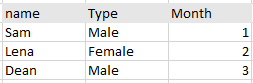
Is it possible for you to share the type of data you have added.

type.PNG

Hello, Its something this like this and I created it, using Create table option in power bi

Thank you for sharing the data @Ganesh08 

I guess you wont be able to change Name and Type but Month can be converted to Numeric Value. 

have you tried using Transform Option ? 

Power Query Editor -> Transform -> Data Type -> Whole number 

Or from Power BI Desktop -> Data View -> Select the column you want to change -> Column Tools -> Format

@JadhavVarsha_13 Yes, I have tried it all and it shows you dont have this option for modification.

Helpful resources

Announcements
New to Fabric survey Carousel

New to Fabric Survey

If you have recently started exploring Fabric, we'd love to hear how it's going. Your feedback can help with product improvements.

Power BI DataViz World Championships carousel

Power BI DataViz World Championships - June 2026

A new Power BI DataViz World Championship is coming this June! Don't miss out on submitting your entry.

Join our Fabric User Panel

Join our Fabric User Panel

Share feedback directly with Fabric product managers, participate in targeted research studies and influence the Fabric roadmap.

March Power BI Update Carousel

Power BI Community Update - March 2026

Check out the March 2026 Power BI update to learn about new features.