Join us at FabCon Atlanta from March 16 - 20, 2026, for the ultimate Fabric, Power BI, AI and SQL community-led event. Save $200 with code FABCOMM.
Register now!The Power BI Data Visualization World Championships is back! It's time to submit your entry. Live now!
Hello Guys,
I have created the data inside power bi with the help of create table option. But when i created this table it automatically assumed data type as text for all the columns and i cannot change the data type to integer now using neither front end nor back end !!
what can i do??
Hello @Ganesh08
Is it possible for you to share the type of data you have added.
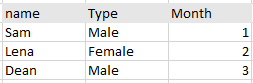
Hello, Its something this like this and I created it, using Create table option in power bi
Thank you for sharing the data @Ganesh08
I guess you wont be able to change Name and Type but Month can be converted to Numeric Value.
have you tried using Transform Option ?
Power Query Editor -> Transform -> Data Type -> Whole number
Or from Power BI Desktop -> Data View -> Select the column you want to change -> Column Tools -> Format
@JadhavVarsha_13 Yes, I have tried it all and it shows you dont have this option for modification.
| User | Count |
|---|---|
| 51 | |
| 38 | |
| 33 | |
| 22 | |
| 19 |
| User | Count |
|---|---|
| 136 | |
| 101 | |
| 58 | |
| 36 | |
| 35 |