Join us at FabCon Atlanta from March 16 - 20, 2026, for the ultimate Fabric, Power BI, AI and SQL community-led event. Save $200 with code FABCOMM.
Register now!The Power BI Data Visualization World Championships is back! Get ahead of the game and start preparing now! Learn more
Hello Guys,
I have created the data inside power bi with the help of create table option. But when i created this table it automatically assumed data type as text for all the columns and i cannot change the data type to integer now using neither front end nor back end !!
what can i do??
Hello @Ganesh08
Is it possible for you to share the type of data you have added.
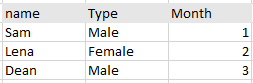
Hello, Its something this like this and I created it, using Create table option in power bi
Thank you for sharing the data @Ganesh08
I guess you wont be able to change Name and Type but Month can be converted to Numeric Value.
have you tried using Transform Option ?
Power Query Editor -> Transform -> Data Type -> Whole number
Or from Power BI Desktop -> Data View -> Select the column you want to change -> Column Tools -> Format
@JadhavVarsha_13 Yes, I have tried it all and it shows you dont have this option for modification.
The Power BI Data Visualization World Championships is back! Get ahead of the game and start preparing now!
Check out the November 2025 Power BI update to learn about new features.
| User | Count |
|---|---|
| 62 | |
| 46 | |
| 42 | |
| 26 | |
| 18 |
| User | Count |
|---|---|
| 193 | |
| 124 | |
| 101 | |
| 67 | |
| 49 |