cancel
Showing results for 
Search instead for 
Did you mean: 

We've captured the moments from FabCon & SQLCon that everyone is talking about, and we are bringing them to the community, live and on-demand. Starts on April 14th. Register now

Reply
Anonymous
Not applicable

Change Data source In Power BI Service

 Hi Everyone,


I have a requirement to change the Data source for the existed reports in Power BI Service.

We have few reports which build based on data from share point folder, now we need to change the data source from share point to Mount drive/Azure in Power BI service itself.


can anyone help me how to change data source in service( I know how to do it in Desktop level)?


1 ACCEPTED SOLUTION
v-kkf-msft
Community Support
Community Support

Hi @Anonymous ,


Please try using Power BI Rest API or XMLA endpoints to change data sources of Power BI dataset.


Using XMLA endpoints to change data sources in a Power BI dataset 

Datasets - Update Datasources In Group 


This is my test steps to change the SharePoint Online data source to a local SQL Server data source using Table Editor on Power BI Service.


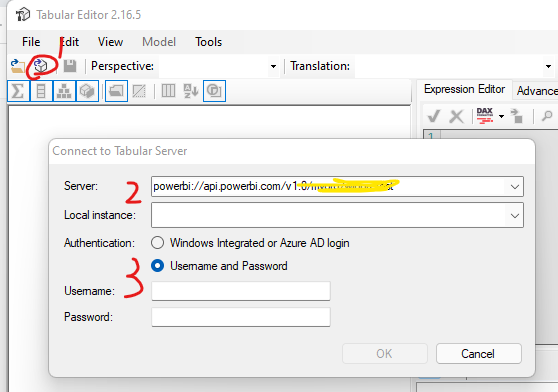
1. Open a Tabular Model from an existing database (Ctrl+Shift+O). The server name is the URL of your PPU/Premium workspace, and then log in with your Power BI account.
 

vkkfmsft_1-1645002406286.png


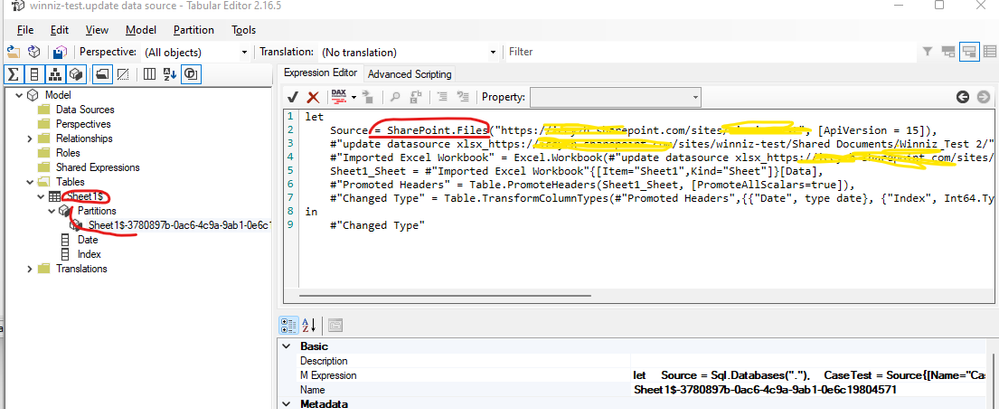
2. Find the partition of the table and you can see that the partition’s M expression shows that the dataset comes from an Excel file on SharePoint Online.
vkkfmsft_2-1645002606966.png


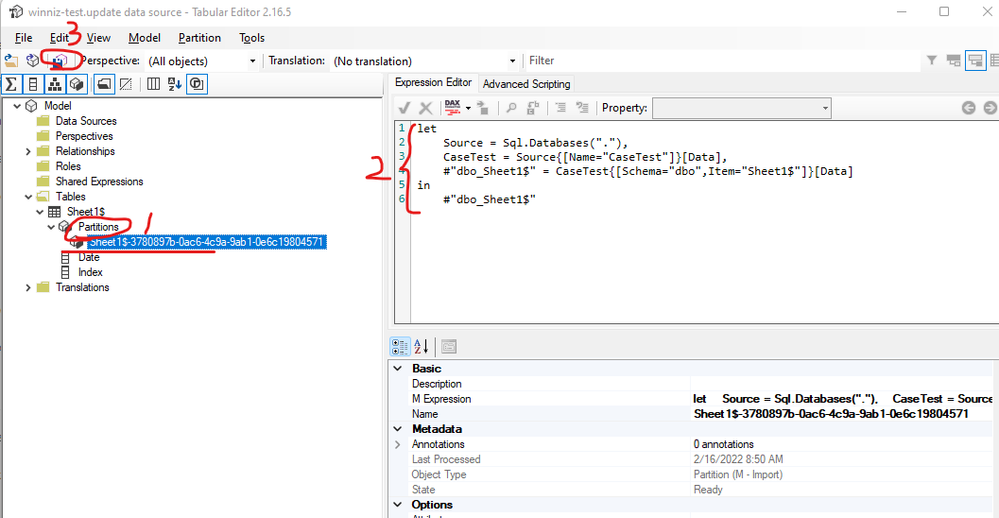
3. Then you need to change the partition’s M expression to SQL Server data source as the following example. Save the changes to the dataset.
 

vkkfmsft_0-1645002349403.png


4. Configure the credentials of the new data source for this dataset on Power BI Service and refresh the dataset.


Note that it is important to ensure that the structure (including table name, column names) of the table imported from the new data source and the old data source are the same, so as to ensure a successful refresh after modifying the data source.


If the problem is still not resolved, please provide detailed error information or the expected result you expect. Let me know immediately, looking forward to your reply.
Best Regards,
Winniz
If this post helps, then please consider Accept it as the solution to help the other members find it more quickly.

View solution in original post

2 REPLIES 2
v-kkf-msft
Community Support
Community Support

Hi @Anonymous ,


Please try using Power BI Rest API or XMLA endpoints to change data sources of Power BI dataset.


Using XMLA endpoints to change data sources in a Power BI dataset 

Datasets - Update Datasources In Group 


This is my test steps to change the SharePoint Online data source to a local SQL Server data source using Table Editor on Power BI Service.


1. Open a Tabular Model from an existing database (Ctrl+Shift+O). The server name is the URL of your PPU/Premium workspace, and then log in with your Power BI account.


vkkfmsft_1-1645002406286.png


2. Find the partition of the table and you can see that the partition’s M expression shows that the dataset comes from an Excel file on SharePoint Online.

vkkfmsft_2-1645002606966.png


3. Then you need to change the partition’s M expression to SQL Server data source as the following example. Save the changes to the dataset.


vkkfmsft_0-1645002349403.png


4. Configure the credentials of the new data source for this dataset on Power BI Service and refresh the dataset.


Note that it is important to ensure that the structure (including table name, column names) of the table imported from the new data source and the old data source are the same, so as to ensure a successful refresh after modifying the data source.


If the problem is still not resolved, please provide detailed error information or the expected result you expect. Let me know immediately, looking forward to your reply.
Best Regards,
Winniz
If this post helps, then please consider Accept it as the solution to help the other members find it more quickly.

goncalogeraldes
Super User
Super User

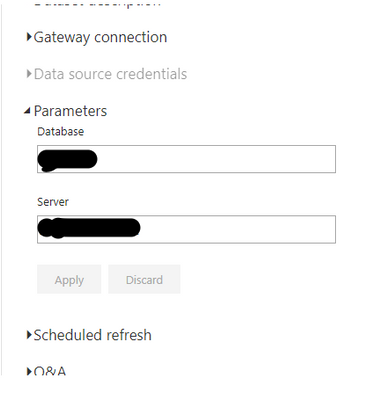
Hello there @Anonymous ! Unless you have your data source parameterized that won't be possible. You can change your source through parameters, although they still have to be from the same type ( SQL DB to SQL DB, Sharepoint Folder to another Folder, for example).


goncalogeraldes_0-1644409894347.png


Here is a post with further explanations on how to do it!


Hope this answer solves your problem!
If you need any additional help please @ me in your reply.
If my reply provided you with a solution, please consider marking it as a solution ✔️ or giving it a kudoe 👍
Thanks!

You can also check out my LinkedIn!

Best regards,
Gonçalo Geraldes

Helpful resources

Announcements
New to Fabric survey Carousel

New to Fabric Survey

If you have recently started exploring Fabric, we'd love to hear how it's going. Your feedback can help with product improvements.

Power BI DataViz World Championships carousel

Power BI DataViz World Championships - June 2026

A new Power BI DataViz World Championship is coming this June! Don't miss out on submitting your entry.

Join our Fabric User Panel

Join our Fabric User Panel

Share feedback directly with Fabric product managers, participate in targeted research studies and influence the Fabric roadmap.

March Power BI Update Carousel

Power BI Community Update - March 2026

Check out the March 2026 Power BI update to learn about new features.