This is best Fabric, Power BI, SQL and AI community event. How do we know? The last event sold out! Save €200 with code FABCMTY200.
Register nowJuly 28 - August 9 | Final Round of the Power BI Dataviz World Championships. This is your chance. Learn more
Hi guys, I want to change the data source of my existing tables. Currently I have 4 tables A,B,C,D which I use in my report. Each of these tables is created by appending 10 csv files. For Example:
TABLE A= 1A.csv+2A.csv+3A.csv+4A.csv+5A.csv+6A.csv+7A.csv+8A.csv+9A.csv+10A.csv
TABLE B= 1B.csv+2B.csv+3B.csv+4B.csv+5B.csv+6B.csv+7B.csv+8B.csv+9B.csv+10B.csv
Same for Table C and D.
Initially (when I was pretty new to PowerBI), I took data from each of the CSVs (Get Data) and appended those into these 4 tables in the Query editor. However I realized that this is a pretty vague approach thus I created a SQL Server Database where I have fully populated Table A,B,C and D with data from all the CSVs. All I want is to change the source of Table A,B,C & D in the report from append query to sql server database. How can I achieve this ?
Solved! Go to Solution.
@Zain26 wrote:
Can you elaborate this with some example.
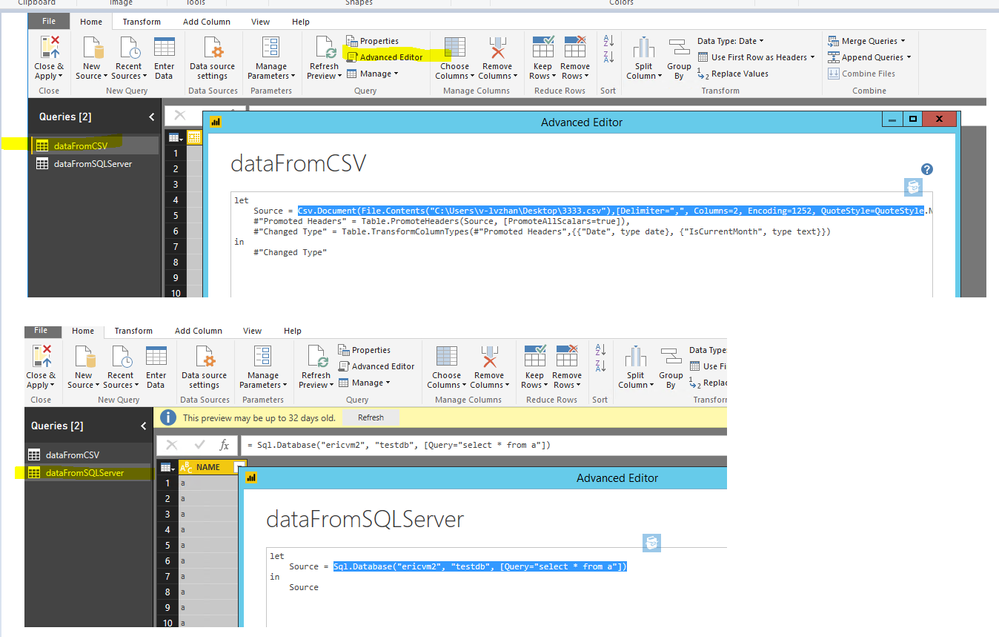
In advanced editor, you just replace the hightlighted part from csv query with the highlight part from SQL Server.
The best way I have found (and best way to learn) is to create a new query to the data in its new location. Then go into the advanced editor and cut the code. Then go into the original query, paste the code at the top, and then delete the old source lines of code leaving just he new ones. See how you go. Each line of code normally refers to the previous line of code in the first parameter. So as long as you get those right, you should be fine
Can you elaborate this with some example.
Join us in Barcelona for FabCon and SQLCon, the Fabric, Power BI, SQL, and AI community event. Save €200 with code FABCMTY200.
If you love stickers, then you will definitely want to check out our community sticker challenge, Barcelona edition!
Check out the July 2026 Power BI update to learn about new features.
| User | Count |
|---|---|
| 25 | |
| 23 | |
| 19 | |
| 18 | |
| 14 |
| User | Count |
|---|---|
| 24 | |
| 20 | |
| 20 | |
| 19 | |
| 18 |