cancel
Showing results for 
Search instead for 
Did you mean: 

The Power BI Data Visualization World Championships is back! Get ahead of the game and start preparing now! Learn more

Reply
Jawed
Helper III
Helper III

Change Column Header Name

I am running my financial dashboard and as one year is now completed, I am trying to replace my budget for a new one. So, the budget column heads used to be called 1/1/2017 and now this is changing to 1/1/2018. However, if I change the header, the update will give me an error saying that the column header has changed. I need to change the header because my comparison between budget and actuals will not work as I change the year to 2018. Any tip on how to change the header and make Power BI to accept the new header name?

1 ACCEPTED SOLUTION

Hi @Jawed,


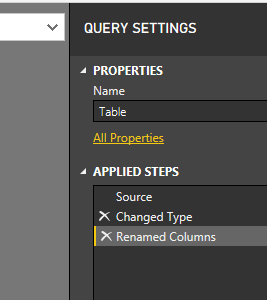
I would suggest renaming columns in the Query Editor where is dedicated to shape data (customize). If we change the column name in the source, some steps that cite the column name directly could be destroyed. 

Change_Column_Header_Name2


Best Regards,

Dale

Community Support Team _ Dale
If this post helps, then please consider Accept it as the solution to help the other members find it more quickly.

View solution in original post

4 REPLIES 4
v-jiascu-msft
Microsoft Employee
Microsoft Employee

Hi @Jawed,


Where did you change the column header? I would suggest you change it in the Query Editor by adding a new step.Change Column Header Name.PNG


Best Regards,

Dale

Community Support Team _ Dale
If this post helps, then please consider Accept it as the solution to help the other members find it more quickly.

Hi @v-jiascu-msft


The name changes were made on the spreadsheet where the data is pulled from as the new data relates to the new year. However, the rest of the data structure is the same. Would you suggest that I rename both the columns in the Power BI and the data spreadsheets?

Hi @Jawed,


I would suggest renaming columns in the Query Editor where is dedicated to shape data (customize). If we change the column name in the source, some steps that cite the column name directly could be destroyed. 

Change_Column_Header_Name2


Best Regards,

Dale

Community Support Team _ Dale
If this post helps, then please consider Accept it as the solution to help the other members find it more quickly.

Thank you, @v-jiascu-msft. I'll leave the source column as they are and rename them in the editor.

Helpful resources

Announcements
Power BI DataViz World Championships

Power BI Dataviz World Championships

The Power BI Data Visualization World Championships is back! Get ahead of the game and start preparing now!

December 2025 Power BI Update Carousel

Power BI Monthly Update - December 2025

Check out the December 2025 Power BI Holiday Recap!

FabCon Atlanta 2026 carousel

FabCon Atlanta 2026

Join us at FabCon Atlanta, March 16-20, for the ultimate Fabric, Power BI, AI and SQL community-led event. Save $200 with code FABCOMM.