This time we’re going bigger than ever. Fabric, Power BI, SQL, AI and more. We're covering it all. You won't want to miss it.
Learn moreDid you hear? There's a new SQL AI Developer certification (DP-800). Start preparing now and be one of the first to get certified. Register now
I am running my financial dashboard and as one year is now completed, I am trying to replace my budget for a new one. So, the budget column heads used to be called 1/1/2017 and now this is changing to 1/1/2018. However, if I change the header, the update will give me an error saying that the column header has changed. I need to change the header because my comparison between budget and actuals will not work as I change the year to 2018. Any tip on how to change the header and make Power BI to accept the new header name?
Solved! Go to Solution.
Hi @Jawed,
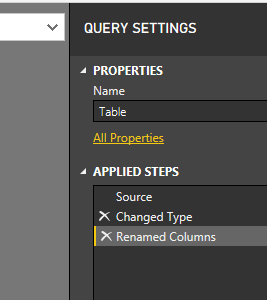
I would suggest renaming columns in the Query Editor where is dedicated to shape data (customize). If we change the column name in the source, some steps that cite the column name directly could be destroyed.
Best Regards,
Dale
Hi @Jawed,
Where did you change the column header? I would suggest you change it in the Query Editor by adding a new step.
Best Regards,
Dale
The name changes were made on the spreadsheet where the data is pulled from as the new data relates to the new year. However, the rest of the data structure is the same. Would you suggest that I rename both the columns in the Power BI and the data spreadsheets?
Hi @Jawed,
I would suggest renaming columns in the Query Editor where is dedicated to shape data (customize). If we change the column name in the source, some steps that cite the column name directly could be destroyed.
Best Regards,
Dale
Thank you, @v-jiascu-msft. I'll leave the source column as they are and rename them in the editor.
Check out the April 2026 Power BI update to learn about new features.
Sign up to receive a private message when registration opens and key events begin.
If you have recently started exploring Fabric, we'd love to hear how it's going. Your feedback can help with product improvements.
| User | Count |
|---|---|
| 34 | |
| 31 | |
| 30 | |
| 21 | |
| 16 |
| User | Count |
|---|---|
| 63 | |
| 53 | |
| 31 | |
| 23 | |
| 23 |