cancel
Showing results for 
Search instead for 
Did you mean: 

Learn from the best! Meet the four finalists headed to the FINALS of the Power BI Dataviz World Championships! Register now

Reply
shudiniu
New Member

Change Calculation based on User's input

Hello all, 


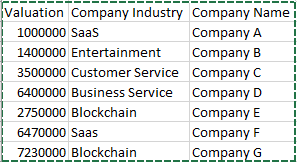
I'm new to POWER BI and really struggling with a small task. In my report, I'm presenting the %weight of our investment companies' industry using a donut visual.


image.png


However is there by any way I can have a user input that represent a new investment, in which user input the investment amount and industry, and this input number will be aggergated and reflected into the donut graph. Does anyone have any good idea on how to do this?


Thank you!!

1 ACCEPTED SOLUTION
v-yuta-msft
Community Support
Community Support

Hi shudiniu,


User can select values in a slicer chart or by using query parameter but can't input values to achieve aggregation value as you want because all of the charts in power bi are based on columns.


Regards,

Jimmy Tao

View solution in original post

1 REPLY 1
v-yuta-msft
Community Support
Community Support

Hi shudiniu,


User can select values in a slicer chart or by using query parameter but can't input values to achieve aggregation value as you want because all of the charts in power bi are based on columns.


Regards,

Jimmy Tao

Helpful resources

Announcements
Join our Fabric User Panel

Join our Fabric User Panel

Share feedback directly with Fabric product managers, participate in targeted research studies and influence the Fabric roadmap.

March Power BI Update Carousel

Power BI Community Update - March 2026

Check out the March 2026 Power BI update to learn about new features.