cancel
Showing results for 
Search instead for 
Did you mean: 

The Power BI Data Visualization World Championships is back! Get ahead of the game and start preparing now! Learn more

Reply
GarvJalandhara
New Member

Challenging: Filter a column, which should be picked using multiple slicers

This one is quite Challenging!
I wish to create 3 slicers (Slicer1: Text1, Slicer2: Text2, Slicer3: Text3), that can collectively chose one of the multiple numeric columns that I have in data (Chosen Column Name = Text1Text2Text3 from slicers). Then, I wish to apply a range filter on the chosen column (e.g. return Text1Text2Text3 for values between 550 and 94000).


I could manage to create a dynamic measure using IFELSE, SWITCH and SELECTEDVALUE functions. However, a measure is an aggreagate and wouldn't help me get a range filter. Any idea how could this be resolved? 


1 ACCEPTED SOLUTION
SunRiser
Regular Visitor

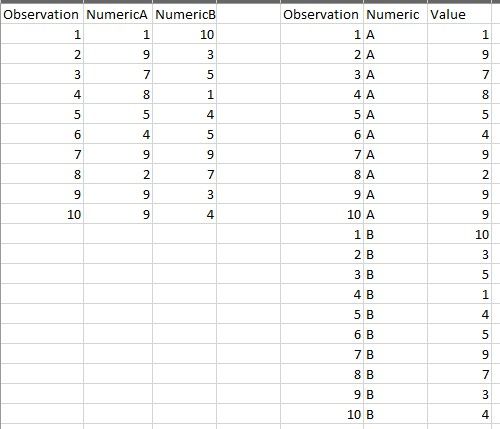
Is there any reason you can't have your numeric columns formatted instead as two columns (attribute / value) pairs? Can these numeric columns be unpivoted in other words? Annotation 2022-07-29 105920.jpg

Using this method, you could simply use the Numeric column for your slicer. Then you can use a "between" slicer for your Value column.

View solution in original post

3 REPLIES 3
SunRiser
Regular Visitor

Is there any reason you can't have your numeric columns formatted instead as two columns (attribute / value) pairs? Can these numeric columns be unpivoted in other words? Annotation 2022-07-29 105920.jpg

Using this method, you could simply use the Numeric column for your slicer. Then you can use a "between" slicer for your Value column.

That's exactly how I have solved for it currently. However, there are a few issues that I face in this approach.
1. The dataset that I have becomes humungously large if I club those 15-20 columns into a single column, and PowerBI becomes slow to process the visulisation changes.
2. As data gets filtered at row-level for a single column value in this approach, there's a problem to create stacked charts or other visuals where I need 2 or more of those numeric columns as values. 

Hi @GarvJalandhara


The field parameter can let you switch the selected column. However, it is not supported to apply a numeric range filter on it to filter the selected column. An explicit filter requires pointing to a specific column with the column name. 


Another option is to use a measure to filter the values. Since you have 15-20 columns, you may need to deal with 15-20 scenarios separately in SWITCH function and filter table in each scenario too. In addition, a measure can only be used on a visual as a filter. It cannot be used as a page or report filter to filter multiple visuals at the same time. 


Sorry I cannot think of other possible or ideal solutions. 


Best Regards,
Community Support Team _ Jing

Helpful resources

Announcements
Power BI DataViz World Championships

Power BI Dataviz World Championships

The Power BI Data Visualization World Championships is back! Get ahead of the game and start preparing now!

December 2025 Power BI Update Carousel

Power BI Monthly Update - December 2025

Check out the December 2025 Power BI Holiday Recap!

FabCon Atlanta 2026 carousel

FabCon Atlanta 2026

Join us at FabCon Atlanta, March 16-20, for the ultimate Fabric, Power BI, AI and SQL community-led event. Save $200 with code FABCOMM.