cancel
Showing results for 
Search instead for 
Did you mean: 

Learn from the best! Meet the four finalists headed to the FINALS of the Power BI Dataviz World Championships! Register now

Reply
Anonymous
Not applicable

Cashflow presentation

Hi all, 

I have a dataset connected to the project online and schedule including many tasks. I am trying to make a monthly cashflow graph but I don't know how to split the costs between months. please see the below 

for an example 

I have this table. imaging the cost has been distributed equally in days. for example Task B each day has 40,000$. 

Task name Start DateFinish DateCost
A10/02/202130/03/2021$1,000,000
B1/04/202120/04/2021$800,000
C15/04/202112/05/2021$400,000


How can I show monthly cashflow??

1 ACCEPTED SOLUTION
v-xulin-mstf
Community Support
Community Support

Hi @Anonymous,


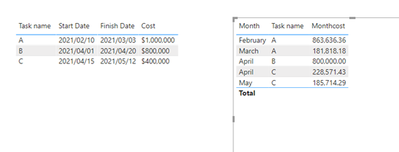
If this meet your need:

v-xulin-mstf_0-1612425366458.png


Here is the demo, please try it: Cashflow presentation


Best Regards

Link


If this post helps then please consider Accept it as the solution to help the other members find it more quickly.

View solution in original post

3 REPLIES 3
v-xulin-mstf
Community Support
Community Support

Hi @Anonymous,


If this meet your need:

v-xulin-mstf_0-1612425366458.png


Here is the demo, please try it: Cashflow presentation


Best Regards

Link


If this post helps then please consider Accept it as the solution to help the other members find it more quickly.

Anonymous
Not applicable

Thanks for that, I commented on that post 

amitchandak
Super User
Super User

@Anonymous , refer my blog on a similar topic can help

https://community.powerbi.com/t5/Community-Blog/How-to-divide-distribute-values-between-start-date-or-end-date/ba-p/1503785


Also find attached find for allocation approch

Share with Power BI Enthusiasts: Full Power BI Video (20 Hours) YouTube
Microsoft Fabric Series 60+ Videos YouTube
Microsoft Fabric Hindi End to End YouTube

Helpful resources

Announcements
Join our Fabric User Panel

Join our Fabric User Panel

Share feedback directly with Fabric product managers, participate in targeted research studies and influence the Fabric roadmap.

February Power BI Update Carousel

Power BI Monthly Update - February 2026

Check out the February 2026 Power BI update to learn about new features.

FabCon Atlanta 2026 carousel

FabCon Atlanta 2026

Join us at FabCon Atlanta, March 16-20, for the ultimate Fabric, Power BI, AI and SQL community-led event. Save $200 with code FABCOMM.