cancel
Showing results for 
Search instead for 
Did you mean: 

The Power BI Data Visualization World Championships is back! Get ahead of the game and start preparing now! Learn more

Reply
Anonymous
Not applicable

Case age calculation

Hi,

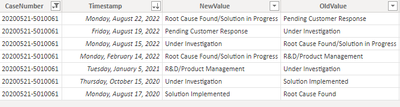
I have date/time logging for different stages of the cases.

Like, First Response Provided, Under Investigation, Solution Provided, Pending customer Response, R&D, Resolved, and Closed.

I want to calculate the case age from the date the case is created.

While calculating the case age, the case age calculation should stop when the case status is changed to either of the following statuses - Pending Customer Response, R&D, or Resolved. For other case status, the case age calculation shall resume.

Rajaganapathy_0-1666182069525.png

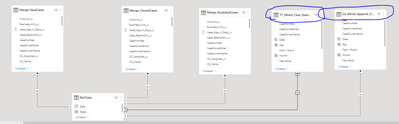
I have a separate table that will log date/time changes in case status. I have another table in which the case created date/time is available. I have made a relationship between these tables.

Rajaganapathy_1-1666182201489.png


Please help me with the correct DAX formula. Thanks i


1 ACCEPTED SOLUTION
Anonymous
Not applicable

Hi @Anonymous ,

I created a sample pbix file(see attachment) for you, please check whether that is what you want. You can create a calculated column as below:

Case stage duration = 
VAR _predate =
    CALCULATE (
        MAX ( 'Table'[Timestamp] ),
        FILTER (
            'Table',
            'Table'[CaseNumber] = EARLIER ( 'Table'[CaseNumber] )
                && 'Table'[Timestamp] < EARLIER ( 'Table'[Timestamp] )
        )
    )
RETURN
    IF (
        'Table'[NewValue]
            IN {
            "Pending Customer Response",
            "R&D/Product Management",
            "Solution Implemented"
        },
        BLANK (),
        DATEDIFF ( _predate, 'Table'[Timestamp], DAY )
    )

yingyinr_2-1666249966310.png


In additon, you can refer the following links to get it:

Get durations from event data

Power BI: Tickets tracking

yingyinr_1-1666249429506.png


If the above ones can't help you get the desired result, please provide some sample data in your tables (exclude sensitive data) with Text format and your expected result with backend logic and special examples. It is better if you can share a simplified pbix file. You can refer the following link to upload the file to the community. Thank you.

How to upload PBI in Community

Best Regards

View solution in original post

3 REPLIES 3
Anonymous
Not applicable

Thank you YingYinr - Thanks so much for your reply. Let me try this solution and come back.

Anonymous
Not applicable

Hi @Anonymous ,

I created a sample pbix file(see attachment) for you, please check whether that is what you want. You can create a calculated column as below:

Case stage duration = 
VAR _predate =
    CALCULATE (
        MAX ( 'Table'[Timestamp] ),
        FILTER (
            'Table',
            'Table'[CaseNumber] = EARLIER ( 'Table'[CaseNumber] )
                && 'Table'[Timestamp] < EARLIER ( 'Table'[Timestamp] )
        )
    )
RETURN
    IF (
        'Table'[NewValue]
            IN {
            "Pending Customer Response",
            "R&D/Product Management",
            "Solution Implemented"
        },
        BLANK (),
        DATEDIFF ( _predate, 'Table'[Timestamp], DAY )
    )

yingyinr_2-1666249966310.png


In additon, you can refer the following links to get it:

Get durations from event data

Power BI: Tickets tracking

yingyinr_1-1666249429506.png


If the above ones can't help you get the desired result, please provide some sample data in your tables (exclude sensitive data) with Text format and your expected result with backend logic and special examples. It is better if you can share a simplified pbix file. You can refer the following link to upload the file to the community. Thank you.

How to upload PBI in Community

Best Regards

Anonymous
Not applicable

Hi,

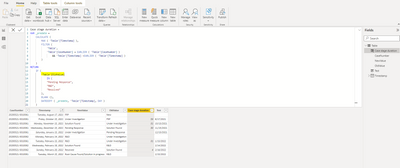
Thank you so much. I just did a little modification to the Formula you suggested.

Instead of "NewValue" - I have changed to "OldValue". I Want to ignore how many days the case stays in "Pending Response" or "R&D" or "Resolved" - when it moves to another state.

So I said the formula to ignore the days between any of the above states to the new stage.

Now I need your help to Ignore the weekend (Saturday & Sunday) from the calculation.

Please support.

Rajaganapathy_0-1666561721194.png


Helpful resources

Announcements
Power BI DataViz World Championships

Power BI Dataviz World Championships

The Power BI Data Visualization World Championships is back! Get ahead of the game and start preparing now!

December 2025 Power BI Update Carousel

Power BI Monthly Update - December 2025

Check out the December 2025 Power BI Holiday Recap!

FabCon Atlanta 2026 carousel

FabCon Atlanta 2026

Join us at FabCon Atlanta, March 16-20, for the ultimate Fabric, Power BI, AI and SQL community-led event. Save $200 with code FABCOMM.