cancel
Showing results for 
Search instead for 
Did you mean: 

Data Days is here! Join us now for 60+ days of learning, challenges, and connection. Learn more

Reply
Anonymous
Not applicable

Case Sensitivity?

Can someone explain to me what is going on.


This is an image of a table in Power Query Editor.

image.png

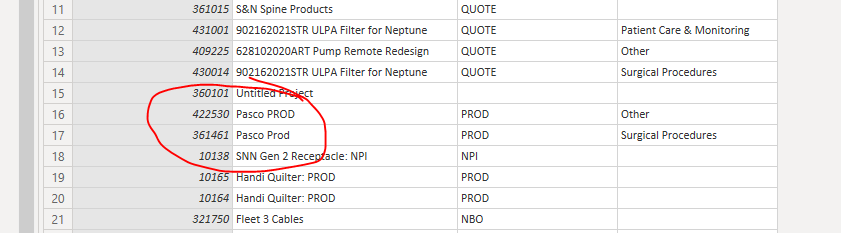
This is an image of some rows from the exact same table in Power BI Desktop.

image.png

Why have the cases changed? I know DAX isn't case sensitive, but it shouldn't be changing data like this, right?

1 ACCEPTED SOLUTION
jdbuchanan71
Super User
Super User

When the data move from PowerQuery into vertipaq (the in memory engine for PowerBI) it translates the data into the dictionary.  The dictonary compresses the data so it is faster to work with for the model engine and because, as far as the vertipaq engine is concerned, 'Pasco Prod' and 'Pasco PROD' are the same, it puts the first version it finds into the dictionary.  Then, when your model goes to get the value for that column from the dictionary, the entry for those two rows get the single value from the dictionary.  It just happened to be that 'Pasco PROD' was saved to the dictionary.  It could just as easily have been 'Pasco Prod' and every where Power Query sent that string in.

  • Pasco Prod
  • PASCO PROD
  • PaScO pRod
  • pASCO pROD
  • etc.

Would all come out as 'Pasco Prod' because that is what the vertipaq dictionary has.

View solution in original post

2 REPLIES 2
v-robertq-msft
Community Support
Community Support

Hi, @Anonymous 

Has jdbuchanan71’s reply helped you to understand the memory engine and case sensitivity in Power BI?

If so, would you like to mark your own reply as a solution so that others can learn from it too?


What’s more, I think you can also take a look at this blog, which explains the formula engine and storage engine in DAX in detail:

https://www.sqlbi.com/articles/formula-engine-and-storage-engine-in-dax/


Thanks in advance!


Best Regards,

Community Support Team _Robert Qin

If this post helps, then please consider Accept it as the solution to help the other members find it more quickly.

jdbuchanan71
Super User
Super User

When the data move from PowerQuery into vertipaq (the in memory engine for PowerBI) it translates the data into the dictionary.  The dictonary compresses the data so it is faster to work with for the model engine and because, as far as the vertipaq engine is concerned, 'Pasco Prod' and 'Pasco PROD' are the same, it puts the first version it finds into the dictionary.  Then, when your model goes to get the value for that column from the dictionary, the entry for those two rows get the single value from the dictionary.  It just happened to be that 'Pasco PROD' was saved to the dictionary.  It could just as easily have been 'Pasco Prod' and every where Power Query sent that string in.

  • Pasco Prod
  • PASCO PROD
  • PaScO pRod
  • pASCO pROD
  • etc.

Would all come out as 'Pasco Prod' because that is what the vertipaq dictionary has.

Helpful resources

Announcements
Fabric Data Days is here Carousel

Fabric Data Days 2026

Don't miss out on Data Days, June 15 through August 7. Learn Fabric, Power BI, SQL, AI and more.

May Power BI Update Carousel

Power BI Monthly Update - May 2026

Check out the May 2026 Power BI update to learn about new features.

Power BI DataViz World Championships carousel

Power BI DataViz World Championships - June 2026

A new Power BI DataViz World Championship is coming this June! Don't miss out on submitting your entry.