Join us at FabCon Atlanta from March 16 - 20, 2026, for the ultimate Fabric, Power BI, AI and SQL community-led event. Save $200 with code FABCOMM.
Register now!The Power BI Data Visualization World Championships is back! It's time to submit your entry. Live now!
Hello everyone,
I'm trying to build a variance report on Power BI and I'm stuck here in building relationships with the two tables. I would much appreciate if you could give me the right direction to get my desired output.
I have two tables Date-Dup which has Department and Date wise budget minutes, I would like to compare this table with Jobs Table which has total minutes by datee
This is the desired output I'm trying to get on BI as of 1/27/2020:
| NewJobClass | Total Minutes | Budget Minutes |
| SEA | 59468 | 56764.8 |
Password to the file: BI2020
Solved! Go to Solution.
Proud to be a Super User!
Hi @trulynaveen ,
Try the following measures:
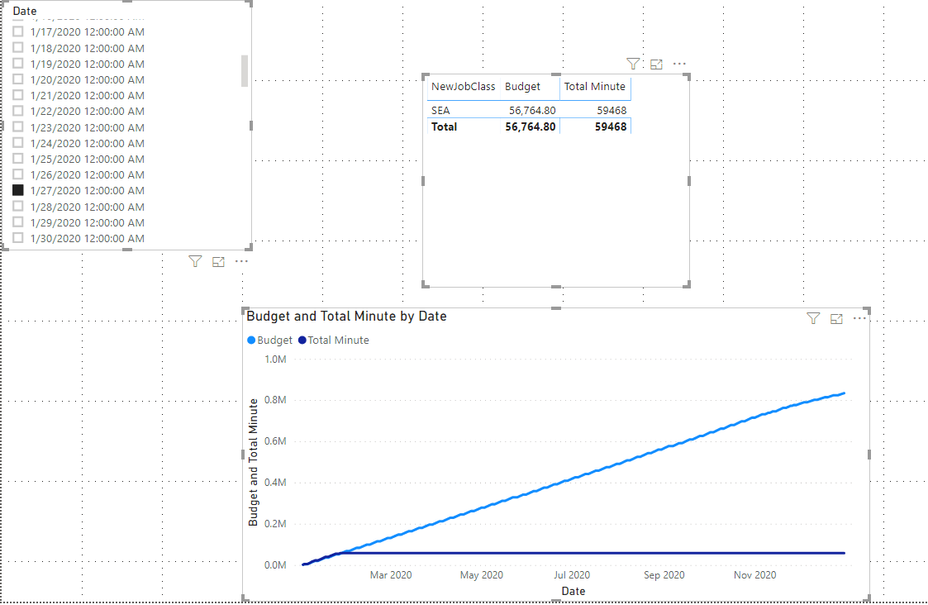
Budget = CALCULATE(SUM('Date-Dup'[Budget Minutes]),FILTER(ALLSELECTED('Date-Dup'),'Date-Dup'[Date]<= MIN('Date'[Date])))Total Minute = CALCULATE(SUM('JobsData'[Total Minutes]),FILTER(ALLSELECTED('JobsData'),'JobsData'[EntryDate]<=MIN('Date'[Date])))
And you will see :
For the related .pbix file,pls click here.
Best Regards,
Kelly
Hi @trulynaveen ,
This can be accomplished without an active relationship. I loaded your data into PBI (big thank you for providing data, that really helps us helping you!) and created the following measures:
Budgeted Minutes = SUMX(FILTER(DateDup, DateDup[Date] <= TODAY()), [Budget Minutes])Actual Minutes =
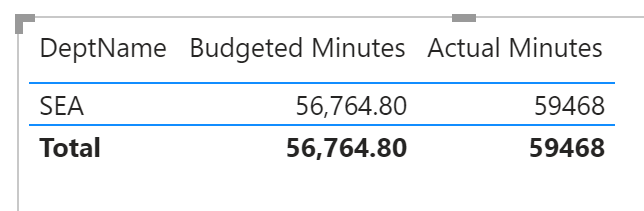
SUMX(FILTER(JobsData, JobsData[NewJobClass] = SELECTEDVALUE(DateDup[DeptName])), [Total Minutes])Then I created a table visual and put in the column DateDup[DeptName] and the two measures, resulting in this:
Does this answer you question?
Kind regards
Djerro123
-------------------------------
If this answered your question, please mark it as the Solution. This also helps others to find what they are looking for.
Keep those thumbs up coming! 🙂
Proud to be a Super User!
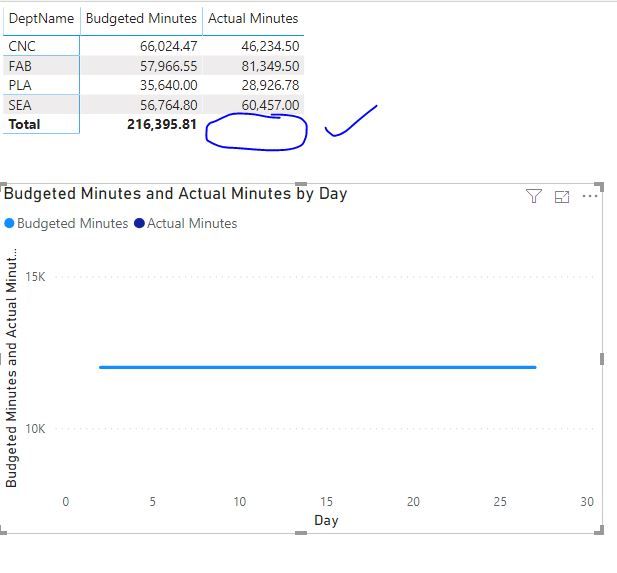
Thank you so much for the help. I just refreshed my data and wide opened to other departments by removing additional filters,now looks like your formula has worked. But I couldn't see the grand total under actual minutes.
Also, is there anyway we can put this on a Line Chart using CalendarAuto()?
Best,
Naveen
Proud to be a Super User!
This worked for me!
| User | Count |
|---|---|
| 49 | |
| 37 | |
| 33 | |
| 22 | |
| 18 |
| User | Count |
|---|---|
| 133 | |
| 99 | |
| 57 | |
| 38 | |
| 38 |