Join us at FabCon Atlanta from March 16 - 20, 2026, for the ultimate Fabric, Power BI, AI and SQL community-led event. Save $200 with code FABCOMM.
Register now!The Power BI Data Visualization World Championships is back! Get ahead of the game and start preparing now! Learn more
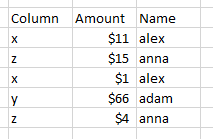
I have table with below type
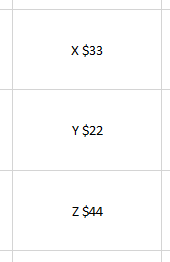
And I want to create 3 seperate card visualizations like below screenshot
I added screenshot with exel sheet, I able to add above details to card group. but I need 3 separate cards . Is their anyway to complete that?
Do I need to add seperate query or measure ? I have no experience working with measures
Thank you in advance.
Solved! Go to Solution.
Hi @Anonymous
I'm not sure how you got the final values in your cards from the data you presented, but I'm guessing you are summing the values for x, y and z?
Here's a sample PBIX file
You can use a measure like this:
X =
CALCULATE(SUM('Cards'[Amount]), FILTER(Cards, Cards[Column] = "x"))
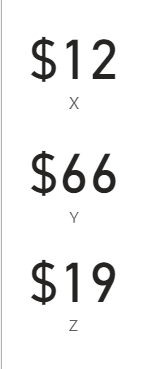
To give this
Regards
Phil
If I answered your question please mark my post as the solution.
If my answer helped solve your problem, give it a kudos by clicking on the Thumbs Up.
Proud to be a Super User!
@Anonymous ,
You Multi Row Card
Or you have to create three measures and use three cards
X= calculate(SUM('Table'[Amount]), FILTER(Table, Table[Column] = "x"))
Y= calculate(SUM('Table'[Amount]), FILTER(Table, Table[Column] = "y"))
Z= calculate(SUM('Table'[Amount]), FILTER(Table, Table[Column] = "z"))
Thanks for the solution, It seems like both solutions are same, I accepted preious answer, Because It replied first. Thank you for the understanding.
Hi @Anonymous
I'm not sure how you got the final values in your cards from the data you presented, but I'm guessing you are summing the values for x, y and z?
Here's a sample PBIX file
You can use a measure like this:
X =
CALCULATE(SUM('Cards'[Amount]), FILTER(Cards, Cards[Column] = "x"))
To give this
Regards
Phil
If I answered your question please mark my post as the solution.
If my answer helped solve your problem, give it a kudos by clicking on the Thumbs Up.
Proud to be a Super User!
Thank you for the solution, Its worked as expectected.
The Power BI Data Visualization World Championships is back! Get ahead of the game and start preparing now!
| User | Count |
|---|---|
| 144 | |
| 123 | |
| 103 | |
| 79 | |
| 54 |