cancel
Showing results for 
Search instead for 
Did you mean: 

Next up in the FabCon + SQLCon recap series: The roadmap for Microsoft SQL and Maximizing Developer experiences in Fabric. All sessions are available on-demand after the live show. Register now

Reply
Anonymous
Not applicable

Card Visualization

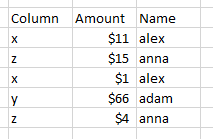
I have table with below type

Dilantha_0-1606801897579.png

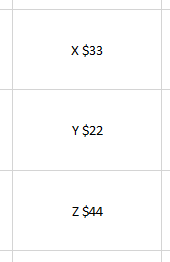
And I want to create 3 seperate card visualizations like below screenshot

Dilantha_1-1606801954717.png

I added screenshot with exel sheet, I able to add above details to card group. but I need 3 separate cards . Is their anyway to complete that?

Do I need to add seperate query or measure ? I have no experience working with measures


Thank you in advance. 

1 ACCEPTED SOLUTION
PhilipTreacy
Super User
Super User

Hi @Anonymous 

I'm not sure how you got the final values in your cards from the data you presented, but I'm guessing you are summing the values for x, y and z?


Here's a sample PBIX file


You can use a measure like this:


X = 
CALCULATE(SUM('Cards'[Amount]), FILTER(Cards, Cards[Column] = "x"))


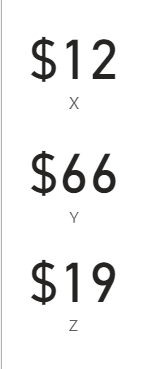
To give this

cards-sums.png

Regards

Phil


If I answered your question please mark my post as the solution.
If my answer helped solve your problem, give it a kudos by clicking on the Thumbs Up.


Did I answer your question? Then please mark my post as the solution.
If I helped you, click on the Thumbs Up to give Kudos.


Blog :: YouTube Channel :: Connect on Linkedin


Proud to be a Super User!


View solution in original post

4 REPLIES 4
amitchandak
Super User
Super User

@Anonymous ,

You Multi Row Card

Or you have to create three measures and use three cards


X= calculate(SUM('Table'[Amount]), FILTER(Table, Table[Column] = "x"))

Y= calculate(SUM('Table'[Amount]), FILTER(Table, Table[Column] = "y"))

Z= calculate(SUM('Table'[Amount]), FILTER(Table, Table[Column] = "z"))


Share with Power BI Enthusiasts: Full Power BI Video (20 Hours) YouTube
Microsoft Fabric Series 60+ Videos YouTube
Microsoft Fabric Hindi End to End YouTube
Anonymous
Not applicable

Thanks for the solution, It seems like both solutions are same, I accepted preious answer, Because It replied first. Thank you for the understanding.

PhilipTreacy
Super User
Super User

Hi @Anonymous 

I'm not sure how you got the final values in your cards from the data you presented, but I'm guessing you are summing the values for x, y and z?


Here's a sample PBIX file


You can use a measure like this:


X = 
CALCULATE(SUM('Cards'[Amount]), FILTER(Cards, Cards[Column] = "x"))


To give this

cards-sums.png

Regards

Phil


If I answered your question please mark my post as the solution.
If my answer helped solve your problem, give it a kudos by clicking on the Thumbs Up.


Did I answer your question? Then please mark my post as the solution.
If I helped you, click on the Thumbs Up to give Kudos.


Blog :: YouTube Channel :: Connect on Linkedin


Proud to be a Super User!


Anonymous
Not applicable

Thank you for the solution, Its worked as expectected.

Helpful resources

Announcements
New to Fabric survey Carousel

New to Fabric Survey

If you have recently started exploring Fabric, we'd love to hear how it's going. Your feedback can help with product improvements.

Power BI DataViz World Championships carousel

Power BI DataViz World Championships - June 2026

A new Power BI DataViz World Championship is coming this June! Don't miss out on submitting your entry.

FabCon and SQLCon Highlights Carousel

FabCon &SQLCon Highlights

Experience the highlights from FabCon & SQLCon, available live and on-demand starting April 14th.

March Power BI Update Carousel

Power BI Community Update - March 2026

Check out the March 2026 Power BI update to learn about new features.