This time we’re going bigger than ever. Fabric, Power BI, SQL, AI and more. We're covering it all. You won't want to miss it.
Learn moreLevel up your Power BI skills this month - build one visual each week and tell better stories with data! Get started
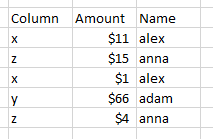
I have table with below type
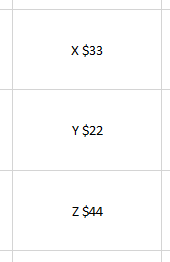
And I want to create 3 seperate card visualizations like below screenshot
I added screenshot with exel sheet, I able to add above details to card group. but I need 3 separate cards . Is their anyway to complete that?
Do I need to add seperate query or measure ? I have no experience working with measures
Thank you in advance.
Solved! Go to Solution.
Hi @Anonymous
I'm not sure how you got the final values in your cards from the data you presented, but I'm guessing you are summing the values for x, y and z?
Here's a sample PBIX file
You can use a measure like this:
X =
CALCULATE(SUM('Cards'[Amount]), FILTER(Cards, Cards[Column] = "x"))
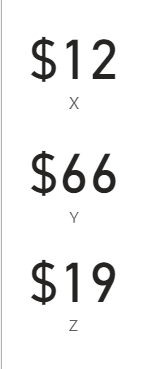
To give this
Regards
Phil
If I answered your question please mark my post as the solution.
If my answer helped solve your problem, give it a kudos by clicking on the Thumbs Up.
Proud to be a Super User!
@Anonymous ,
You Multi Row Card
Or you have to create three measures and use three cards
X= calculate(SUM('Table'[Amount]), FILTER(Table, Table[Column] = "x"))
Y= calculate(SUM('Table'[Amount]), FILTER(Table, Table[Column] = "y"))
Z= calculate(SUM('Table'[Amount]), FILTER(Table, Table[Column] = "z"))
Thanks for the solution, It seems like both solutions are same, I accepted preious answer, Because It replied first. Thank you for the understanding.
Hi @Anonymous
I'm not sure how you got the final values in your cards from the data you presented, but I'm guessing you are summing the values for x, y and z?
Here's a sample PBIX file
You can use a measure like this:
X =
CALCULATE(SUM('Cards'[Amount]), FILTER(Cards, Cards[Column] = "x"))
To give this
Regards
Phil
If I answered your question please mark my post as the solution.
If my answer helped solve your problem, give it a kudos by clicking on the Thumbs Up.
Proud to be a Super User!
Thank you for the solution, Its worked as expectected.
Check out the April 2026 Power BI update to learn about new features.
Sign up to receive a private message when registration opens and key events begin.
If you have recently started exploring Fabric, we'd love to hear how it's going. Your feedback can help with product improvements.
| User | Count |
|---|---|
| 33 | |
| 29 | |
| 29 | |
| 21 | |
| 18 |
| User | Count |
|---|---|
| 69 | |
| 48 | |
| 33 | |
| 24 | |
| 24 |