Share feedback directly with Fabric product managers, participate in targeted research studies and influence the Fabric roadmap.
Sign up nowGet Fabric certified for FREE! Don't miss your chance! Learn more
Hello,
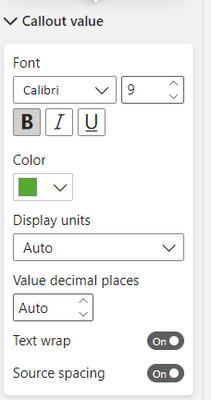
I am trying to customize the formatting of the callout value in the card visual to be green/red based on the field values. I had been successfully able to do that and the formatting still exists in the report - however, if I go to update it, I can no longer see that fx button when I go to the callout value. I know I created rules that would update the formatting in the card visuals and I have no idea why that option has suddenly disappeared. I tried creating a new visual, and same thing - cant find that button! Has anyone else encountered this?
Thank you!
Solved! Go to Solution.
Hi there!
This is an issue from the last update, the PBI team is working on it so expect a solution soon. You can follow the status of the issue here!
https://community.powerbi.com/t5/Issues/Conditional-Formatting-missing-in-September-release/idi-p/27...
Let me know if that helps!
Hi @newpbiuser01 ,
This is a bug with recent Power BI month's update. It has already been reported to Microsoft team. They will roll out the fix soon.
Hi there!
This is an issue from the last update, the PBI team is working on it so expect a solution soon. You can follow the status of the issue here!
https://community.powerbi.com/t5/Issues/Conditional-Formatting-missing-in-September-release/idi-p/27...
Let me know if that helps!
oh thank goodness! I thought I was going crazy and just didnt remember it correctly! thank you!
Share feedback directly with Fabric product managers, participate in targeted research studies and influence the Fabric roadmap.
| User | Count |
|---|---|
| 57 | |
| 53 | |
| 42 | |
| 18 | |
| 14 |
| User | Count |
|---|---|
| 111 | |
| 104 | |
| 35 | |
| 28 | |
| 27 |