cancel
Showing results for 
Search instead for 
Did you mean: 

The Power BI Data Visualization World Championships is back! Get ahead of the game and start preparing now! Learn more

Reply
Thimios
Helper III
Helper III

Cannot refresh dataset

Hi everyone.

Since yesterday I cannot refresh my dataset both in desktop and in service. Connection is to SharePoint and I get a message saying I don't have access although I have admin rights and nothing changed in configuration since last worked in Power BI.

Is this a general Power BI issue? Is there another place where I can get support on that?

Thank you!


1 ACCEPTED SOLUTION

Thank you Yuliana but tried that already.

What I found that works, is logging out from open browser and closing that browser. Then everything works prefect in BI. Tested that 3-4 times and it really solves the issue... 

I suppose that there might be a conflict somewhere in authentication. I always use the same user, so there is no chance in making a mistake here.

View solution in original post

5 REPLIES 5
v-yulgu-msft
Microsoft Employee
Microsoft Employee

Hi @Thimios ,


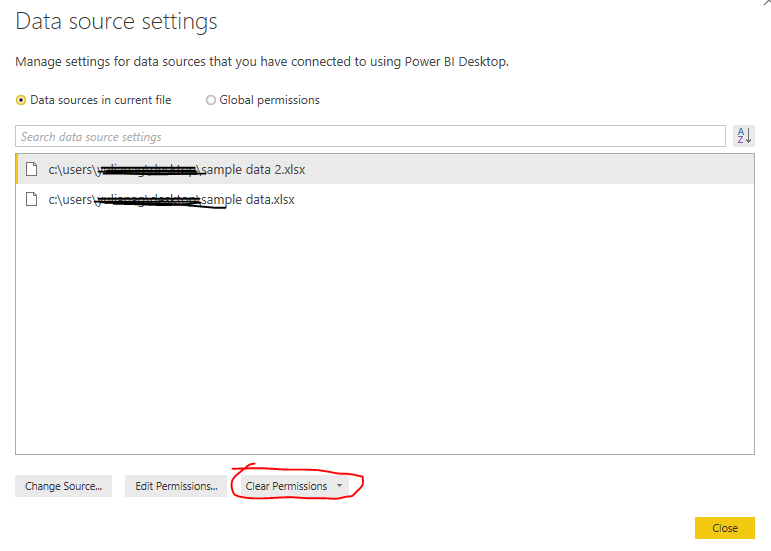
Make sure you are able to log into SharePoint site with current account. Then, in Power BI desktop, clear the cached credential, establish connection to data source and try again.

1.PNG

Best regards,

Yuliana Gu

Community Support Team _ Yuliana Gu
If this post helps, then please consider Accept it as the solution to help the other members find it more quickly.

Thank you Yuliana but tried that already.

What I found that works, is logging out from open browser and closing that browser. Then everything works prefect in BI. Tested that 3-4 times and it really solves the issue... 

I suppose that there might be a conflict somewhere in authentication. I always use the same user, so there is no chance in making a mistake here.

Anonymous
Not applicable

Then, please check your gateway to refresh the SP data.


Regards,

Pradeep

Anonymous
Not applicable

Hi Thimios,


This is not Power BI Issue. Check your credentials to SharePoint and network where you have enough bandwidth to connect to SharePoint source.


Sometimes, your credentials are not saved and it will wait for you to provide.


Hope this helps you a lot.


Regards,

Pradeep

Hi Pradeep,


This is not a credentials issue. I logged out and relogged in using that same account but nothing changed. Message I get is the following. Where else should I look into?


Something went wrong
Scheduled refresh has been disabled.
Please try again later or contact support. If you contact support, please provide these details.
Data source error: Scheduled refresh is disabled because at least one data source is missing credentials. To start the refresh again, go to this dataset's settings page and enter credentials for all data sources. Then reactivate scheduled refresh.

Helpful resources

Announcements
Power BI DataViz World Championships

Power BI Dataviz World Championships

The Power BI Data Visualization World Championships is back! Get ahead of the game and start preparing now!

December 2025 Power BI Update Carousel

Power BI Monthly Update - December 2025

Check out the December 2025 Power BI Holiday Recap!

FabCon Atlanta 2026 carousel

FabCon Atlanta 2026

Join us at FabCon Atlanta, March 16-20, for the ultimate Fabric, Power BI, AI and SQL community-led event. Save $200 with code FABCOMM.