cancel
Showing results for 
Search instead for 
Did you mean: 

Try your skills in the Power BI Dataviz World Championship! Round one ends June 26. Join now

Reply
Anonymous
Not applicable

Cannot display visual (DirectQuery and AAS)

Hi,


I have 4 datasets in 1 workspace and I load up the 4 datasets with the new DirectQuery and AAS (preview version) in my target dataset where I made my measures etc. Everthing works fine until I publish it to the PowerBI Services APP. The end users that do not have access to the workspace can not see the visuals. I have given the end users read&build permissions on all 5 datasets.


Why are they still getting the visual error?

5 REPLIES 5
Anonymous
Not applicable

@SivaMani thank you! that clearified a few things.


I was using the classic workspace and upgraded to the new workspace type, because I do not want to add the endusers as workspace members.


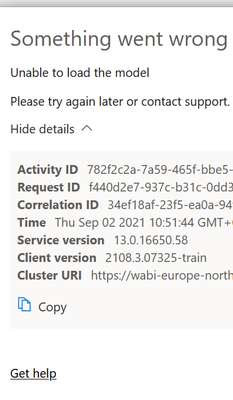
However after the upgrade my endusers get a new error. Only if I add them as a member to the new workspace it resolves the error and they can view the reports without any problem. But according to point 5 in your printscreen, that should not be necessary...right?

RHBIP_0-1630578100164.png


@Anonymous, Glad that we are making progress towards the solution.


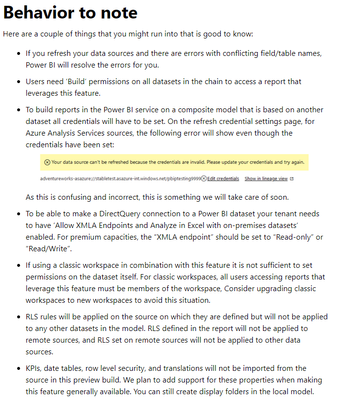
Refer #2, Users need BUILD Permission.  Check this out - https://docs.microsoft.com/en-us/power-bi/connect-data/service-datasets-manage-access-permissions#op...


Add your end users to the datasets permission with Build access. It will resolve the issue.


Members access The reason why member access resolves the issue is members of the workspace will have the owner privileges to the datasets under the workspace by default. In this case, users don't need a separate build permission.


Thanks,

Siva Mani

Anonymous
Not applicable

Hi @SivaMani 


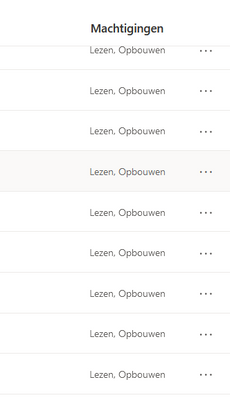
I was aware of the build permissions, all the users have read & build permissions an all the 4 direct query datasets and on the main dataset, see printscreen below. But still the error remains...

RHBIP_0-1630584155051.png


@Anonymous, 

 if you're using a New workspace with Build permission, it should work in your case. I would suggest you contact support - https://powerbi.microsoft.com/en-us/support/


SivaMani
Resident Rockstar
Resident Rockstar

@Anonymous ,


Check this out, it may help you to resolve the issue - https://powerbi.microsoft.com/en-us/blog/directquery-for-power-bi-datasets-and-azure-analysis-servic...


SivaMani_0-1630333899965.png


Helpful resources

Announcements
Fabric Data Days is here Carousel

Fabric Data Days 2026

Don't miss out on Data Days, June 15 through August 7. Learn Fabric, Power BI, SQL, AI and more.

May Power BI Update Carousel

Power BI Monthly Update - May 2026

Check out the May 2026 Power BI update to learn about new features.

Power BI DataViz World Championships carousel

Power BI DataViz World Championships - June 2026

A new Power BI DataViz World Championship is coming this June! Don't miss out on submitting your entry.