Join us at FabCon Atlanta from March 16 - 20, 2026, for the ultimate Fabric, Power BI, AI and SQL community-led event. Save $200 with code FABCOMM.
Register now!The Power BI Data Visualization World Championships is back! Get ahead of the game and start preparing now! Learn more
I am trying to combine around 1000 excel workbooks. However, It does not get combined due to some error which I don't know.
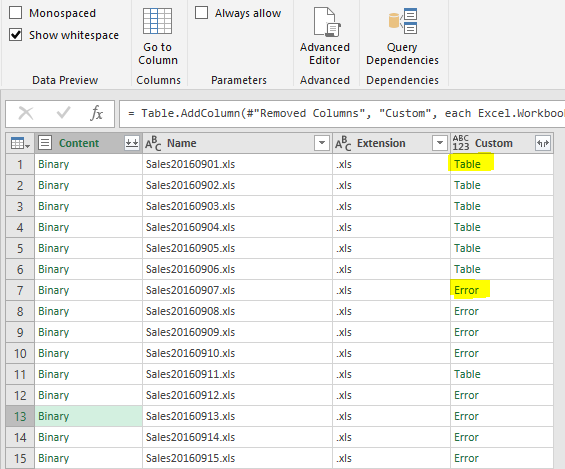
Then I try to add custom column and write Excel.Workbook([Content]) and I get the following:
Some are Table, the rest are ERROR.
All excel workbooks I am trying to import have same format.
Due to this Error, I cannot Combine and Edit the binary upon Import.
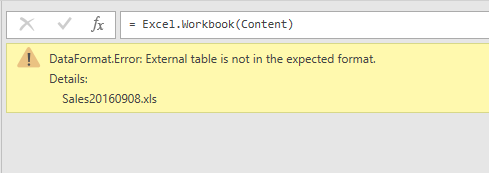
When I double click in the Error. I get the folloing message, but the workbook is correctly in excel format.
Thanks for support!
Solved! Go to Solution.
Hello, I found a soultion. The files had some errors in it (files arrived through an automated system in excel 97-2003 version). But when I open and save the file in excel, the error disappeared and appeared as table in PowerBI and could combine all.
So I opened and saved all in mass with a Macro. Now all is OK.
Thanks you anyway.
Hi,
Share a couple of sample workbooks which are showing an error in the Custom column. Please ensure the file sizes are small.
Hello, I found a soultion. The files had some errors in it (files arrived through an automated system in excel 97-2003 version). But when I open and save the file in excel, the error disappeared and appeared as table in PowerBI and could combine all.
So I opened and saved all in mass with a Macro. Now all is OK.
Thanks you anyway.
The Power BI Data Visualization World Championships is back! Get ahead of the game and start preparing now!
| User | Count |
|---|---|
| 61 | |
| 43 | |
| 40 | |
| 38 | |
| 22 |
| User | Count |
|---|---|
| 178 | |
| 125 | |
| 116 | |
| 77 | |
| 54 |