Don't miss your chance to take the Fabric Data Engineer (DP-700) exam on us!
Learn moreWe've captured the moments from FabCon & SQLCon that everyone is talking about, and we are bringing them to the community, live and on-demand. Starts on April 14th. Register now
I have a table visual with values added from table columns (not measures). Many of the columns have aggregates applied (sum, latest, etc.). However, I cannot change aggregation or aggregate any new columns added. e.g. You can see in this tooltip that Payments Insurance is aggregated as a Sum.
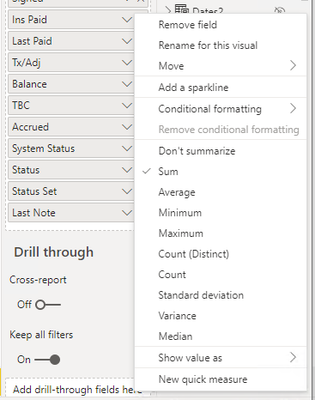
However, if I right-click the value name (Ins Paid) or click the chevron, I can neither change or remove the aggregation. This is the case for every value in the visual.
When I look at a much older version of the report, I can do so as expected.
I am unable to revert the report to the much older version, due to the wealth of changes. Both reports are using the same version of PBI desktop (same machine). What could cause this?
Solved! Go to Solution.
For any who stumble on this, itt would appear that this is because of a calculation group in the newer report, where implicit measures can no longer be created https://docs.microsoft.com/en-us/analysis-services/tabular-models/calculation-groups?view=asallprodu...
@ribisht17
No, the column is numeric in both. That is why you see numeric aggregations like Sum instead of First/Last.
If you have recently started exploring Fabric, we'd love to hear how it's going. Your feedback can help with product improvements.
A new Power BI DataViz World Championship is coming this June! Don't miss out on submitting your entry.
Share feedback directly with Fabric product managers, participate in targeted research studies and influence the Fabric roadmap.
| User | Count |
|---|---|
| 55 | |
| 34 | |
| 32 | |
| 19 | |
| 17 |
| User | Count |
|---|---|
| 75 | |
| 72 | |
| 38 | |
| 35 | |
| 25 |