Join us at FabCon Atlanta from March 16 - 20, 2026, for the ultimate Fabric, Power BI, AI and SQL community-led event. Save $200 with code FABCOMM.
Register now!The Power BI Data Visualization World Championships is back! It's time to submit your entry. Live now!
Hi,
I have this query entry that I cannot delete. This query was originally belonged to a number of queries created when entering a local folder of files as a new source. The query was a parameter selecting which sample file to use for the sample transformations to apply to the rest of the files in the folder. After some changes to the model, the local folder of files is no longer where the data is and should be deleted however I cannot. It keeps saying it's being referenced by another query but I cannot figure out where this other query is. I've named the query in question as "DELETE ME".
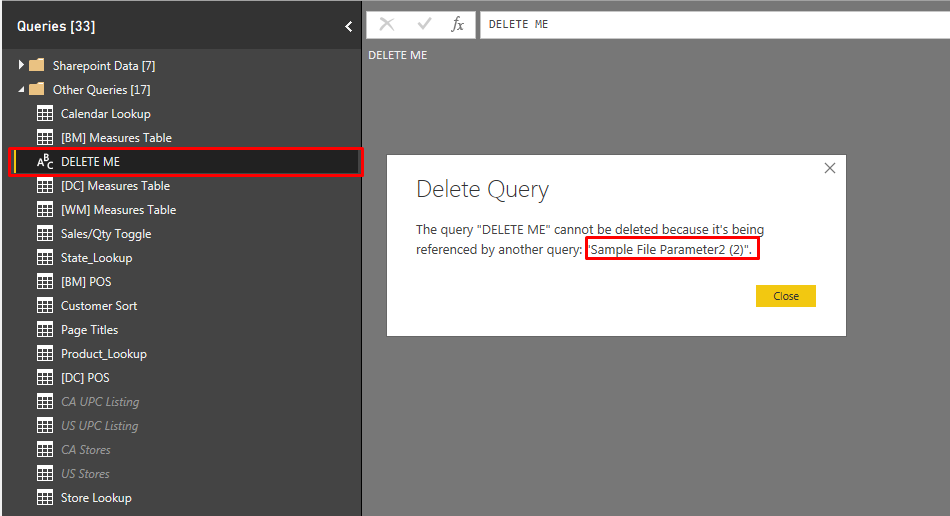
In the below image you can see the error message I get when trying to delete. I cannot find where this "Sample File Parameter2 (2)" is for the life of me.
Delete Error Message
I've tried converting the query to a table or parameter. deleting all the M code etc. Nothing seems to work.
Power Query Coding
Per my query dependencies view, there's nothing this query is related to.
No dependencies?
Please help. My sanity depends on it!!
Hi There,
I could fix it by rewrtting the merging i was doing. When you re-merge you basically unlink for good the query you want to delete. After that I could delete the query without having the annoying error message.
The Power BI Data Visualization World Championships is back! It's time to submit your entry.
| User | Count |
|---|---|
| 50 | |
| 43 | |
| 36 | |
| 33 | |
| 30 |
| User | Count |
|---|---|
| 138 | |
| 120 | |
| 60 | |
| 59 | |
| 56 |