cancel
Showing results for 
Search instead for 
Did you mean: 

The Power BI Data Visualization World Championships is back! Get ahead of the game and start preparing now! Learn more

Reply
andynoodle
Regular Visitor

Cannot Access Conditional Formatting in Tables

Hello,


I have updated power BI desktop to the latest version, and do not see the optoin for "conditional formatting" on the dropdown menu anywhere. I see tutorials saying you can use conditional formatting on a table by click the dropdown on a field in the "values" section. Do I need to activate this feature?


1 ACCEPTED SOLUTION
zivhimmel
Resolver I
Resolver I

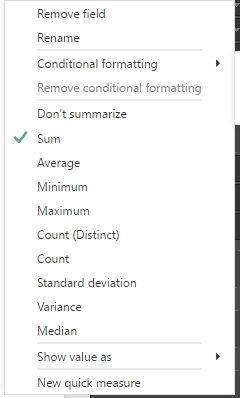
I believe conditional format will only work on aggregated columns or measures. See the two conditions below:

cap1.PNG


cap2.PNG


Hopefully that helps.


Ziv Himmelfarb

https://www.superfarb.com


View solution in original post

1 REPLY 1
zivhimmel
Resolver I
Resolver I

I believe conditional format will only work on aggregated columns or measures. See the two conditions below:

cap1.PNG


cap2.PNG


Hopefully that helps.


Ziv Himmelfarb

https://www.superfarb.com


Helpful resources

Announcements
Power BI DataViz World Championships

Power BI Dataviz World Championships

The Power BI Data Visualization World Championships is back! Get ahead of the game and start preparing now!

December 2025 Power BI Update Carousel

Power BI Monthly Update - December 2025

Check out the December 2025 Power BI Holiday Recap!

FabCon Atlanta 2026 carousel

FabCon Atlanta 2026

Join us at FabCon Atlanta, March 16-20, for the ultimate Fabric, Power BI, AI and SQL community-led event. Save $200 with code FABCOMM.