Join us at FabCon Atlanta from March 16 - 20, 2026, for the ultimate Fabric, Power BI, AI and SQL community-led event. Save $200 with code FABCOMM.
Register now!The Power BI Data Visualization World Championships is back! Get ahead of the game and start preparing now! Learn more
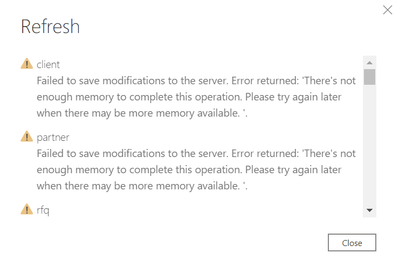
Please help. Refresh on Desktop suddenly stopped working with the below message.
I tried everything I could:
I mean... Everything I found on this forum didn't work for me! Please help ....
Hi @Anonymous ,
Please filter your resource table, and just load the necessary data.
There are some tips about managing Memory, you can review them in this similar thread.
In addition, I found a blog on how to work around this problem,please check if this could help you a little.😀
Best Regards,
Eyelyn Qin
If this post helps, then please consider Accept it as the solution to help the other members find it more quickly.
Hi @Anonymous ,
This genereally happens with me when I have less than 10 GB memory left in my laptop.
I can tell you what I usually do to address it.
To free up some space:
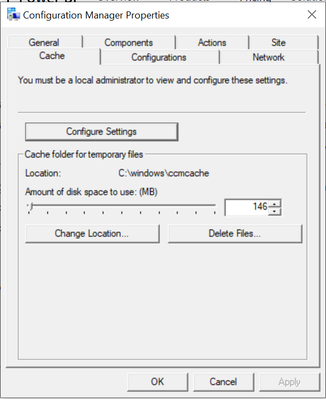
1) Reduce the dedicated space for Cache, steps below:
a. Go to Control Panel-->Configuration Manager -->Cache tab -->Configure settings and reduce the value as low as possible as shown in the screen shot. Then delete files and OK.
2) Do a "Disk Cleanup" which will delete all the temporary files and the deleted files which are not in use.
If clearing some space also doesn't fix the issue, rather than refreshing all the application at once, I refresh the queries one by one.
See if that helps for you.
Appreciate your response. However, I couldn't find configuration manager on my windows 10. Searched for it on Google but no luck 😞
The Power BI Data Visualization World Championships is back! Get ahead of the game and start preparing now!
Check out the November 2025 Power BI update to learn about new features.
| User | Count |
|---|---|
| 59 | |
| 43 | |
| 42 | |
| 23 | |
| 17 |
| User | Count |
|---|---|
| 190 | |
| 122 | |
| 96 | |
| 66 | |
| 47 |