cancel
Showing results for 
Search instead for 
Did you mean: 

A new Data Days event is coming soon! This time we’re going bigger than ever. Fabric, Power BI, SQL, AI and more. Don't miss out.

Reply
Anonymous
Not applicable

Can't display visual, when using date filter in Direct Query

Hi, 


I'm trying to set up some basic tables and visuals in Power BI Desktop, connecting to a SQL Server (2016) database using Direct Query. I have no issues accessing the data, setting up the data model, and updating etc., but whenever I try to add date filters to the calendar dimension I get the error posted below. When I switch to Import Mode it works fine, so I guess it has something to do with how PBI queries the data from the source. 


Does anyone know how to resolve this issue?


pbi error.PNG

5 REPLIES 5
v-eachen-msft
Community Support
Community Support

Hi @Anonymous ,


Has your problem been solved? Was my reply helpful to you? If the problem is resolved, you could accept the reply you like.


Community Support Team _ Eads
If this post helps, then please consider Accept it as the solution to help the other members find it.
Anonymous
Not applicable

Hi @v-eachen-msft 


Unfortunately not. 

amitchandak
Super User
Super User

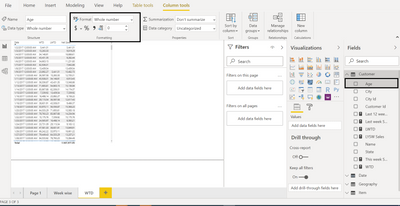
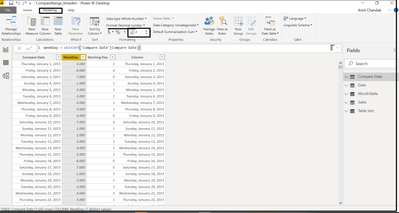
Check the Data type of the column on both sides of the join. Or is the data type of a date is changed in power bi . Make sure it is date

Data Format New Rib.pngData Format.png

Share with Power BI Enthusiasts: Full Power BI Video (20 Hours) YouTube
Microsoft Fabric Series 60+ Videos YouTube
Microsoft Fabric Hindi End to End YouTube
Anonymous
Not applicable

Hi, thanks for your reply. 


The data type is already set to date. I'm querying both dimensions and facts. I'm trying to filter a fact table, using a date dimension if that's of any help. 

Hi @Anonymous ,


You could refer to this resolved case which is similar to yours.

https://community.powerbi.com/t5/Service/the-conversion-of-a-marcher-data-type-to-a-dateline-data-ty...


Community Support Team _ Eads
If this post helps, then please consider Accept it as the solution to help the other members find it.

Helpful resources

Announcements
May Power BI Update Carousel

Power BI Monthly Update - May 2026

Check out the May 2026 Power BI update to learn about new features.

Fabric SQL PBI Data Days

Data Days 2026 coming soon!

Sign up to receive a private message when registration opens and key events begin.

New to Fabric survey Carousel

New to Fabric Survey

If you have recently started exploring Fabric, we'd love to hear how it's going. Your feedback can help with product improvements.

Power BI DataViz World Championships carousel

Power BI DataViz World Championships - June 2026

A new Power BI DataViz World Championship is coming this June! Don't miss out on submitting your entry.