cancel
Showing results for 
Search instead for 
Did you mean: 

The Power BI Data Visualization World Championships is back! Get ahead of the game and start preparing now! Learn more

Reply
JGroothedde
Resolver II
Resolver II

Can't add Power BI dataset to local model and vice versa (Premium per user workspace)

Hi everyone,

I am dumbfounded. For a while now it has been impossible for me to connect Desktop to a Premium per user workspace, but only if a local model is involved. What's going on?

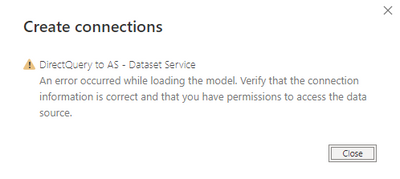
For example: when i create a new report in Power BI desktop and connect to my Power BI Dataset that's hosted in a Premium per user workspace, all is fine. Works perfectly. Once i try to add a local model to add another source, even an Excel file, the message below pops up..

JGroothedde_0-1680527900476.png


Same thing happens when i turn it around. I create a desktop file, add an Excel source to it and then try to connect to a dataset in a premium per user workspace and i get the same message. Very frustrating honestly. Interestingly, this does not occur when connecting to a dataset in an Pro workspace.

What's the deal? Anyone know whether this is a known issue or how to fix this?


1 ACCEPTED SOLUTION
JGroothedde
Resolver II
Resolver II

Well. I figured it out. For anyone having the same issue: in our case the culprit was a trailing space behind the name of the dataset. I.E: datasetname .pbix instead of datasetname.pbix.


Removing the trailing space solved the issue we've been having for a couple of months now. No wonder i couldn't find anything about it. 

Cheers @amitchandak  for the suggestions. I hope this helps someone else someday, lol.

View solution in original post

3 REPLIES 3
JGroothedde
Resolver II
Resolver II

Well. I figured it out. For anyone having the same issue: in our case the culprit was a trailing space behind the name of the dataset. I.E: datasetname .pbix instead of datasetname.pbix.


Removing the trailing space solved the issue we've been having for a couple of months now. No wonder i couldn't find anything about it. 

Cheers @amitchandak  for the suggestions. I hope this helps someone else someday, lol.

amitchandak
Super User
Super User

@JGroothedde , first add a dataset to the empty power bi file, Then make it a direct query using the option in the modeling tab.  And then add an excel file


Make sure the login on the desktop has access to dataset

Share with Power BI Enthusiasts: Full Power BI Video (20 Hours) YouTube
Microsoft Fabric Series 60+ Videos YouTube
Microsoft Fabric Hindi End to End YouTube

Hi there Amit,

Cheers for the suggestion, unfortunately this doesn't change the outcome. I have verified that desktop has access to the dataset, it easily connects to it. Issues arise when trying to make changes to the local model. I get the screen where you can select the tables you want and then the screenshot above. It fails creating a local model. Again, it works fine when the dataset is hosted in a Pro workspace.


I'm stumped haha

Helpful resources

Announcements
Power BI DataViz World Championships

Power BI Dataviz World Championships

The Power BI Data Visualization World Championships is back! Get ahead of the game and start preparing now!

December 2025 Power BI Update Carousel

Power BI Monthly Update - December 2025

Check out the December 2025 Power BI Holiday Recap!

FabCon Atlanta 2026 carousel

FabCon Atlanta 2026

Join us at FabCon Atlanta, March 16-20, for the ultimate Fabric, Power BI, AI and SQL community-led event. Save $200 with code FABCOMM.