Join us at FabCon Atlanta from March 16 - 20, 2026, for the ultimate Fabric, Power BI, AI and SQL community-led event. Save $200 with code FABCOMM.
Register now!The Power BI Data Visualization World Championships is back! Get ahead of the game and start preparing now! Learn more
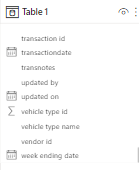
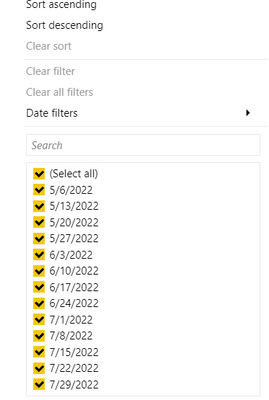
The below is the table I am working with, and I want to rank by week ending date.
I am trying to formula :
Solved! Go to Solution.
@Spudder112 , Hope you are creating a column not measure
This should work as column
Week Rank = RANKX(('Table 1'),'Table 1'[week ending date],,ASC,Dense)
Also it is always better to have a separate Date/week Table
Power BI — Week on Week and WTD
https://medium.com/@amitchandak.1978/power-bi-wtd-questions-time-intelligence-4-5-98c30fab69d3
https://community.powerbi.com/t5/Community-Blog/Week-Is-Not-So-Weak-WTD-Last-WTD-and-This-Week-vs-La...
https://www.youtube.com/watch?v=pnAesWxYgJ8
@Spudder112 , Hope you are creating a column not measure
This should work as column
Week Rank = RANKX(('Table 1'),'Table 1'[week ending date],,ASC,Dense)
Also it is always better to have a separate Date/week Table
Power BI — Week on Week and WTD
https://medium.com/@amitchandak.1978/power-bi-wtd-questions-time-intelligence-4-5-98c30fab69d3
https://community.powerbi.com/t5/Community-Blog/Week-Is-Not-So-Weak-WTD-Last-WTD-and-This-Week-vs-La...
https://www.youtube.com/watch?v=pnAesWxYgJ8
Ah, I was using the measure feature instead of column. Thank you! Also for reminding me to make a separate date table.
The Power BI Data Visualization World Championships is back! Get ahead of the game and start preparing now!
Check out the November 2025 Power BI update to learn about new features.
| User | Count |
|---|---|
| 62 | |
| 46 | |
| 42 | |
| 26 | |
| 18 |
| User | Count |
|---|---|
| 193 | |
| 124 | |
| 101 | |
| 67 | |
| 49 |