This time we’re going bigger than ever. Fabric, Power BI, SQL, AI and more. We're covering it all. You won't want to miss it.
Learn moreDid you hear? There's a new SQL AI Developer certification (DP-800). Start preparing now and be one of the first to get certified. Register now
Solved! Go to Solution.
Hi @Josearce
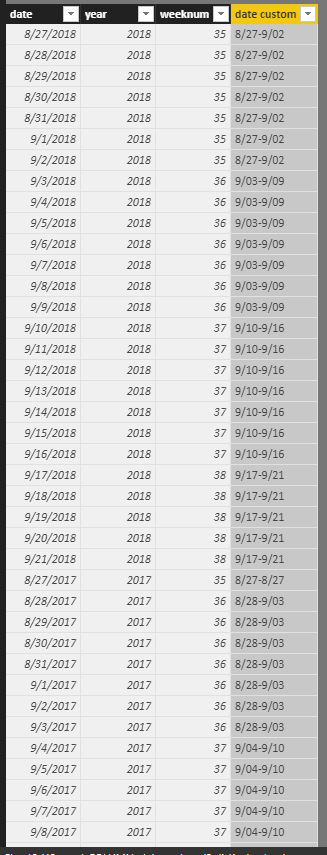
Create three calculated columns as below
year = YEAR([date])
weeknum = WEEKNUM([date],2)
date custom =
CONCATENATE (
CONCATENATE (
FORMAT (
CALCULATE (
MIN ( [date] ),
ALLEXCEPT ( Sheet8, Sheet8[year], Sheet8[weeknum] )
),
"m/dd"
),
"-"
),
FORMAT (
CALCULATE (
MAX ( [date] ),
ALLEXCEPT ( Sheet8, Sheet8[year], Sheet8[weeknum] )
),
"m/dd"
)
)
Best Reagrds
Maggie
Hi @Josearce
Create three calculated columns as below
year = YEAR([date])
weeknum = WEEKNUM([date],2)
date custom =
CONCATENATE (
CONCATENATE (
FORMAT (
CALCULATE (
MIN ( [date] ),
ALLEXCEPT ( Sheet8, Sheet8[year], Sheet8[weeknum] )
),
"m/dd"
),
"-"
),
FORMAT (
CALCULATE (
MAX ( [date] ),
ALLEXCEPT ( Sheet8, Sheet8[year], Sheet8[weeknum] )
),
"m/dd"
)
)
Best Reagrds
Maggie
Thanks Maggie...I did something with the formula to present it more organized:
Weekfromto =
VAR Desde = format(Calculate(min('Calendar Table'[Date]),ALLEXCEPT('Calendar Table','Calendar Table'[Year],'Calendar Table'[Week#])),"mmm-dd-yy")
VAR Hasta = format(Calculate(max('Calendar Table'[Date]),ALLEXCEPT('Calendar Table','Calendar Table'[Year],'Calendar Table'[Week#])),"mmm-dd-yy")
RETURN
Desde &" - "& Hasta
Desde means From and Hasta means Through
Check out the April 2026 Power BI update to learn about new features.
Sign up to receive a private message when registration opens and key events begin.
If you have recently started exploring Fabric, we'd love to hear how it's going. Your feedback can help with product improvements.
| User | Count |
|---|---|
| 35 | |
| 32 | |
| 27 | |
| 23 | |
| 16 |
| User | Count |
|---|---|
| 65 | |
| 50 | |
| 30 | |
| 25 | |
| 24 |