
cancel
Showing results for 
Search instead for 
Did you mean: 

Join the FabCon + SQLCon recap series. Up next: Power BI, Real-Time Intelligence, IQ and AI, and Data Factory take center stage. All sessions are available on-demand after the live show. Register now

Reply
wetherington
Frequent Visitor

Calendar Table Data Filter

Hi Everyone,


In my current data model, I have two tables Orders and Invoices in these tables I have a date column which I have associated with my calendar table.  Which works for my Invoice --> Calendar table but it does not work for my Order --> Calendar table.  When I use the filter Fiscal Year in my calendar table it displays the correct fiscal year data related to the Invoice table but for my order table, it returns (Blank).  To try to solve this I changed the date field that is used in the relationship with another on the Order table which seemed to have worked.  However, this is not the date which I would like to reference for this report. 


The data type is Date Only

Format MMMM, DD, YYYY


Any advice would be greatly appreciated. 


Thank you,

Wil


6 REPLIES 6
amitchandak
Super User
Super User

@wetherington , as long as data type is date, it should work. I doubt it has a timestamp. Change the problematic Date's Datatype as datetime and change format that display time also.


If it has time create a date and join with date table

New column

Date =[Datetime].date


Share with Power BI Enthusiasts: Full Power BI Video (20 Hours) YouTube
Microsoft Fabric Series 60+ Videos YouTube
Microsoft Fabric Hindi End to End YouTube

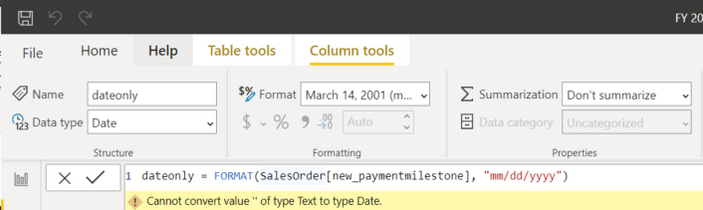
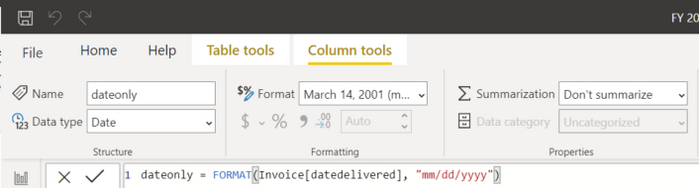
@amitchandak I added a date only column but am receiving #Error.  This is the same formula that I used on my Invoice date only and it worked fine. 


Order Table


wetherington_2-1597170121236.png


Invoice Table 

wetherington_1-1597170011057.png


Thanks! 

Wil

@wetherington , seems like newpayment milestone is text. First, try to change that to date

Share with Power BI Enthusiasts: Full Power BI Video (20 Hours) YouTube
Microsoft Fabric Series 60+ Videos YouTube
Microsoft Fabric Hindi End to End YouTube

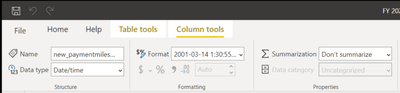
I tried to change the column to both Date and Date/time.  Still didn't work. 


wetherington_0-1597235993816.png


wetherington_1-1597236016684.png


@wetherington,

Can you change the data type from Power Query Editor once and then check. Do let us know if you face any error with DAX.


Thanks !

Hi @wetherington ,


From the DAX warning/error message, it is pretty clear here that your 'new_paymentmilestone' column from 'SalesOrder' table is not in date format and that's why FORMAT function is not able to convert it to desired mm/dd/yyyy format.

I guess this is the same reason for the joining not working with SalesOrder table.


Please change the data type of your 'new_paymentmilestone' column from 'SalesOrder' table to DATE and try.


Give a thumbs up if this post helped you in any way and mark this post as solution if it solved your query !!!

Helpful resources

Announcements
April Power BI Update Carousel

Power BI Monthly Update - April 2026

Check out the April 2026 Power BI update to learn about new features.

New to Fabric survey Carousel

New to Fabric Survey

If you have recently started exploring Fabric, we'd love to hear how it's going. Your feedback can help with product improvements.

Power BI DataViz World Championships carousel

Power BI DataViz World Championships - June 2026

A new Power BI DataViz World Championship is coming this June! Don't miss out on submitting your entry.

FabCon and SQLCon Highlights Carousel

FabCon &SQLCon Highlights

Experience the highlights from FabCon & SQLCon, available live and on-demand starting April 14th.