Don't miss your chance to take the Fabric Data Engineer (DP-600) exam for FREE! Find out how by watching the DP-600 session on-demand now through April 28th.
Learn moreJoin the FabCon + SQLCon recap series. Up next: Power BI, Real-Time Intelligence, IQ and AI, and Data Factory take center stage. All sessions are available on-demand after the live show. Register now
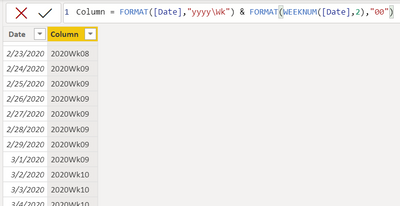
I have created a date table using DAX ...
Solved! Go to Solution.
@duncanwil
You can use the right function (WEEKNUM) to extract the week number than the FORMAT function. Use the following calendar table code. it should work for you.
Dates =
VAR StartYear = 2020
VAR EndYear = 2021
VAR DatesColumn =
CALENDAR(
DATE(StartYear , 1 , 1),
DATE(EndYear, 12 , 31)
)
RETURN
ADDCOLUMNS(
DatesColumn,
"Month No" , MONTH([Date]),
"Month Name" , FORMAT( [Date] , "Mmmm" ),
"Year" , YEAR([Date]),
"Month Year No" , (YEAR([Date]) * 100) + MONTH([Date]),
"Month Year" , FORMAT( [Date] , "Mmm yyyy"),
"Quarter" , QUARTER([Date]),
"Qtr Name" , FORMAT( [Date] , "\QQ"),
"Week Day" , WEEKDAY([Date],2),
"Week" , FORMAT( [Date] , "Dddd" ),
"Week No" , WEEKNUM([Date],2),
"Week Num" , "WK - " & WEEKNUM([Date],2)
)
⭕ Subscribe and learn Power BI from these videos
⚪ Website ⚪ LinkedIn ⚪ PBI User Group
Thank you both. I have to confess that I had read those pages/suggestions but my lack of DAX experience led me to assume FORMAT was OK.
So, I repgrammed to use WEEKNUM and so on and the tables are behaving as expected.
Duncan
Detailed reference
https://docs.microsoft.com/en-us/dax/format-function-dax
| Thanks to the great efforts by MS engineers to simplify syntax of DAX! Most beginners are SUCCESSFULLY MISLED to think that they could easily master DAX; but it turns out that the intricacy of the most frequently used RANKX() is still way beyond their comprehension! |
DAX is simple, but NOT EASY! |
@duncanwil
You can use the right function (WEEKNUM) to extract the week number than the FORMAT function. Use the following calendar table code. it should work for you.
Dates =
VAR StartYear = 2020
VAR EndYear = 2021
VAR DatesColumn =
CALENDAR(
DATE(StartYear , 1 , 1),
DATE(EndYear, 12 , 31)
)
RETURN
ADDCOLUMNS(
DatesColumn,
"Month No" , MONTH([Date]),
"Month Name" , FORMAT( [Date] , "Mmmm" ),
"Year" , YEAR([Date]),
"Month Year No" , (YEAR([Date]) * 100) + MONTH([Date]),
"Month Year" , FORMAT( [Date] , "Mmm yyyy"),
"Quarter" , QUARTER([Date]),
"Qtr Name" , FORMAT( [Date] , "\QQ"),
"Week Day" , WEEKDAY([Date],2),
"Week" , FORMAT( [Date] , "Dddd" ),
"Week No" , WEEKNUM([Date],2),
"Week Num" , "WK - " & WEEKNUM([Date],2)
)
⭕ Subscribe and learn Power BI from these videos
⚪ Website ⚪ LinkedIn ⚪ PBI User Group
Check out the April 2026 Power BI update to learn about new features.
If you have recently started exploring Fabric, we'd love to hear how it's going. Your feedback can help with product improvements.
A new Power BI DataViz World Championship is coming this June! Don't miss out on submitting your entry.
| User | Count |
|---|---|
| 43 | |
| 37 | |
| 34 | |
| 21 | |
| 16 |
| User | Count |
|---|---|
| 65 | |
| 64 | |
| 31 | |
| 26 | |
| 25 |