cancel
Showing results for 
Search instead for 
Did you mean: 

Try your skills in the Power BI Dataviz World Championship! Round one ends June 26. Join now

Reply
JuliaWendel
Regular Visitor

Calculation within a table

Hello,


I'm not very experienced with PowerBI, maybe anybody can help me out with my issue:


I would like to add a ne column and the cells should be calculated for each row new:


I have a start value e.g. = 200 --> active products

Two columns for the calculation are given by the data base: 1) "product launch" and the other is 2)  "product expire"


Example:

Start value: 200

Date: January

Product launch: +2

Product expire: -1

--> Calculate active products for January and write it in new column: 200 + 2 - 1 = 201 active products


Start Value 201

Date: February

Product launch: +3

Product expire: -1

--> Calculate active products for February and write it in the cell below the upper calculation: 201+3-1: 203 active products


Claclulation.PNG


Is it possible with the SUMX formula?


Thank you in advance!!!


Julia


1 ACCEPTED SOLUTION
Eric_Zhang
Microsoft Employee
Microsoft Employee


@JuliaWendel wrote:

Hello,


I'm not very experienced with PowerBI, maybe anybody can help me out with my issue:


I would like to add a ne column and the cells should be calculated for each row new:


I have a start value e.g. = 200 --> active products

Two columns for the calculation are given by the data base: 1) "product launch" and the other is 2)  "product expire"


Example:

Start value: 200

Date: January

Product launch: +2

Product expire: -1

--> Calculate active products for January and write it in new column: 200 + 2 - 1 = 201 active products


Start Value 201

Date: February

Product launch: +3

Product expire: -1

--> Calculate active products for February and write it in the cell below the upper calculation: 201+3-1: 203 active products


Claclulation.PNG


Is it possible with the SUMX formula?


Thank you in advance!!!


Julia


@JuliaWendel

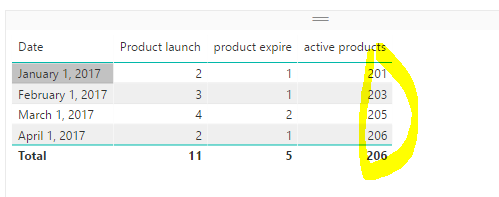
So my understanding is, it is actually 200 + accumulative(product launch - product expire) in your case. Then you can create a measure as 

active products = 
200
    + SUMX (
        FILTER ( ALL ( yourtable ), yourtable[date] <= MAX ( yourtable[date] ) ),
        yourtable[product launch] - yourtable[product expire]
    ) 

Capture.PNG

View solution in original post

2 REPLIES 2
Eric_Zhang
Microsoft Employee
Microsoft Employee


@JuliaWendel wrote:

Hello,


I'm not very experienced with PowerBI, maybe anybody can help me out with my issue:


I would like to add a ne column and the cells should be calculated for each row new:


I have a start value e.g. = 200 --> active products

Two columns for the calculation are given by the data base: 1) "product launch" and the other is 2)  "product expire"


Example:

Start value: 200

Date: January

Product launch: +2

Product expire: -1

--> Calculate active products for January and write it in new column: 200 + 2 - 1 = 201 active products


Start Value 201

Date: February

Product launch: +3

Product expire: -1

--> Calculate active products for February and write it in the cell below the upper calculation: 201+3-1: 203 active products


Claclulation.PNG


Is it possible with the SUMX formula?


Thank you in advance!!!


Julia


@JuliaWendel

So my understanding is, it is actually 200 + accumulative(product launch - product expire) in your case. Then you can create a measure as 

active products = 
200
    + SUMX (
        FILTER ( ALL ( yourtable ), yourtable[date] <= MAX ( yourtable[date] ) ),
        yourtable[product launch] - yourtable[product expire]
    ) 

Capture.PNG

@Eric_Zhang Thank you very much, it worked out very well!


I got another question:

is it possible to calculate the difference within one column between two months?


E.g. 

Month: January

Product launch: 5


Month: February

Product launch: 7


--> calculate in new column the difference between "Product launch" February and "Product launch" January:

7-5 = +2

ExplanationExplanation

Maybe you now a solution or anybody else.

Thank you in advance!

Julia

Helpful resources

Announcements
Fabric Data Days is here Carousel

Fabric Data Days 2026

Don't miss out on Data Days, June 15 through August 7. Learn Fabric, Power BI, SQL, AI and more.

Power BI DataViz World Championships carousel

Power BI DataViz World Championships - June 2026

A new Power BI DataViz World Championship is coming this June! Don't miss out on submitting your entry.