Join us at FabCon Atlanta from March 16 - 20, 2026, for the ultimate Fabric, Power BI, AI and SQL community-led event. Save $200 with code FABCOMM.
Register now!The Power BI Data Visualization World Championships is back! It's time to submit your entry. Live now!
Hi Gents,
Need your support with the following:
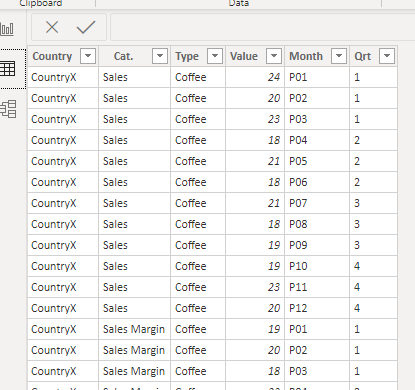
I have this table
| Type | P01 | P.. | P12 | ||
| CountryX | Sales | Coffee | |||
| CountryX | Sales Margin | Coffee | |||
| CountryX | Sales | Tea | |||
| CountryX | Sales Margin | Tea |
I Want to do the following:
Calculate Q1 Sales = P01+P02+P03
Calculate Q1 Sales Margin = P01+P02+P03
.
same until Q4
I thought of Unpivotting P01-P12 but then what?
I want to have a stacked graph where I can display 2 bars, one for sales and one for sales margin next to each others while the x-axis is the quarter.
And then create another stacked column to display the sales and sales margin while the X axis is the Type
Thanks
Solved! Go to Solution.
Hi, @abukapsoun , how about calculating number of quarter after unpivoting P01-P12. The sales data then is tranformed to a one-dimensional table. A pbix file is attached for your reference.
| Thanks to the great efforts by MS engineers to simplify syntax of DAX! Most beginners are SUCCESSFULLY MISLED to think that they could easily master DAX; but it turns out that the intricacy of the most frequently used RANKX() is still way beyond their comprehension! |
DAX is simple, but NOT EASY! |
@abukapsoun , First of unpivot the table. Then Create Period table With Period and Qtr , if you have the year you can add that. Or Create a year period table. Create period rank if needed qtr rank .
new column in period table
Qtr = Switch (true(),
[period] in {"P01","P02","P03"}, "1",
[period] in {"P04","P05","P06"}, "2"
///keep on adding
}
Here Date is your period table
Month Rank = RANKX(all('Date'),'Date'[Period],,ASC,Dense) // period or year -period
This Month = CALCULATE(sum('order'[Qty]), FILTER(ALL('Date'),'Date'[Month Rank]=max('Date'[Month Rank])))
Last Month = CALCULATE(sum('order'[Qty]), FILTER(ALL('Date'),'Date'[Month Rank]=max('Date'[Month Rank])-1))
Last year Month= CALCULATE(sum('order'[Qty]), FILTER(ALL('Date'),'Date'[Month Rank]=(max('Date'[Month Rank]) -12)))
Qtr or Qtr Rank
Qtr Rank = RANKX(all('Date'),'Date'[Qtr],,ASC,Dense) //on Qtr or Year - Qtr
This Qtr = CALCULATE(sum('order'[Qty]), FILTER(ALL('Date'),'Date'[Qtr Rank]=max('Date'[Qtr Rank])))
Last Qtr = CALCULATE(sum('order'[Qty]), FILTER(ALL('Date'),'Date'[Qtr Rank]=max('Date'[Qtr Rank])-1))
Hi, @abukapsoun , how about calculating number of quarter after unpivoting P01-P12. The sales data then is tranformed to a one-dimensional table. A pbix file is attached for your reference.
| Thanks to the great efforts by MS engineers to simplify syntax of DAX! Most beginners are SUCCESSFULLY MISLED to think that they could easily master DAX; but it turns out that the intricacy of the most frequently used RANKX() is still way beyond their comprehension! |
DAX is simple, but NOT EASY! |
The Power BI Data Visualization World Championships is back! It's time to submit your entry.
Check out the January 2026 Power BI update to learn about new features.
| User | Count |
|---|---|
| 60 | |
| 47 | |
| 29 | |
| 25 | |
| 23 |
| User | Count |
|---|---|
| 126 | |
| 108 | |
| 55 | |
| 39 | |
| 33 |