Get certified for free when you join Fabric Data Days 2026 and dive into Fabric, Power BI, SQL, AI, and other essential data skills.
Join nowJuly 7 - July 17 | Round 2 of the Power BI Dataviz World Championships. Don't miss your chance! Learn more
i try to calculate the count of entries within a column depending on the (multiple) filter option. In my table I have 3 different columns:
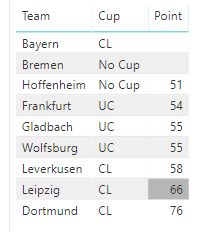
1. Team
2. Cup: This should be my filter with the options (CL, UC, No Cup)
3. Points: This is information I want (not the sum, just the number of entries that are not blank).
For example, if someone selects "CL" than the result should be 3, because one entries does not have information on that.
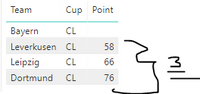
I chose the following formula:
Test = if(SELECTEDVALUE(Tabelle1[Cup])="CL";CALCULATE(COUNT(Tabelle1[Point]));if(SELECTEDVALUE(Tabelle1[Cup])="UC";CALCULATE(COUNT(Tabelle1[Point]));"false"))
But if someone selects "CL" and "UC" than I don't know how to calculate the correct number of entries depending on the filter selection.
What I want: One single dynamic card, which shows the number of entries in the "Points"-column depending on the filter selection.
Solved! Go to Solution.
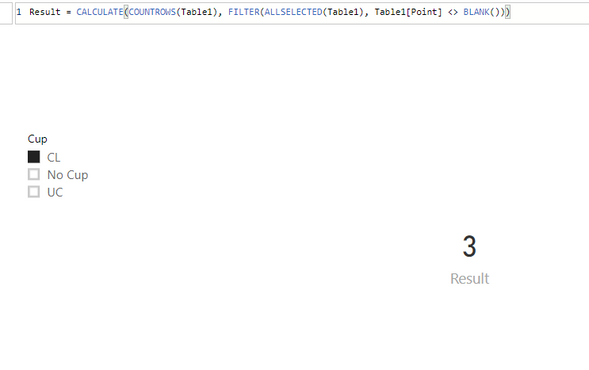
Result = CALCULATE(COUNTROWS(Table1), FILTER(ALLSELECTED(Table1), Table1[Point] <> BLANK()))
Community Support Team _ Jimmy Tao
If this post helps, then please consider Accept it as the solution to help the other members find it more quickly.
Result = CALCULATE(COUNTROWS(Table1), FILTER(ALLSELECTED(Table1), Table1[Point] <> BLANK()))
Community Support Team _ Jimmy Tao
If this post helps, then please consider Accept it as the solution to help the other members find it more quickly.
Join us in Barcelona for FabCon and SQLCon, the Fabric, Power BI, SQL, and AI community event. Save €200 with code FABCMTY200.
Join Data Days 2026: 60 days of free live/on-demand sessions, challenges, study groups, and certification opportunities.
| User | Count |
|---|---|
| 27 | |
| 24 | |
| 18 | |
| 15 | |
| 15 |
| User | Count |
|---|---|
| 63 | |
| 42 | |
| 41 | |
| 38 | |
| 37 |