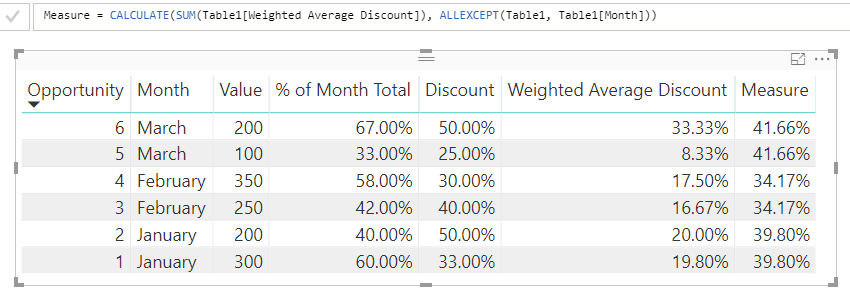
I am pulling data from SFDC which contains the Value of each deal booked and also the discount used for the deal. I want to summarise the data by month to show the Total Value, Average Value and then do a calculation to find the Weighted Average Discount for each month.
The Weighted Average Discount is calculated like this:
(Value/Total Value) * Discount = Weighted Average Discount
We then sum up the Weighted Average Disounts for each deal to give the Weighted Average Discount that we are looking for.
For example, these are the opportunities that closed in a quarter. We get the Opportunity, Month and Discount from the SFDC table but we need to calculate the % of Month Total and the Weighted Average Discount.
| Opportunity | Month | Value | % of Month Total | Discount | Weighted Average Discount |
| 1 | January | 300 | 60% | 33% | 19.80% |
| 2 | January | 200 | 40% | 50% | 20.00% |
| 3 | February | 250 | 42% | 40% | 16.67% |
| 4 | February | 350 | 58% | 30% | 17.50% |
| 5 | March | 100 | 33% | 25% | 8.33% |
| 6 | March | 200 | 67% | 50% | 33.33% |
In this example the Average weighted discount for March would be 41.67% (8.33% + 33.33%).
How can I add these calculated columns to my data so that I can do the calculations to find the Weighted Average Discount?
Thanks