cancel
Showing results for 
Search instead for 
Did you mean: 

A new Data Days event is coming soon! This time we’re going bigger than ever. Fabric, Power BI, SQL, AI and more. Don't miss out.

Reply
PaulCo
Helper II
Helper II

Calculation based on Column Average

I am pulling data from SFDC which contains the Value of each deal booked and also the discount used for the deal. I want to summarise the data by month to show the Total Value, Average Value and then do a calculation to find the Weighted Average Discount for each month. 


The Weighted Average Discount is calculated like this:


(Value/Total Value) * Discount = Weighted Average Discount


We then sum up the Weighted Average Disounts for each deal to give the Weighted Average Discount that we are looking for.


For example, these are the opportunities that closed in a quarter. We get the Opportunity, Month and Discount from the SFDC table but we need to calculate the % of Month Total and the Weighted Average Discount.


OpportunityMonthValue% of Month TotalDiscountWeighted Average Discount
1January30060%33%19.80%
2January20040%50%20.00%
3February25042%40%16.67%
4February35058%30%17.50%
5March10033%25%8.33%
6March20067%50%33.33%


In this example the Average weighted discount for March would be 41.67% (8.33% + 33.33%).


How can I add these calculated columns to my data so that I can do the calculations to find the Weighted Average Discount? 


Thanks

1 ACCEPTED SOLUTION
v-yuta-msft
Community Support
Community Support

Hi PaulCo,


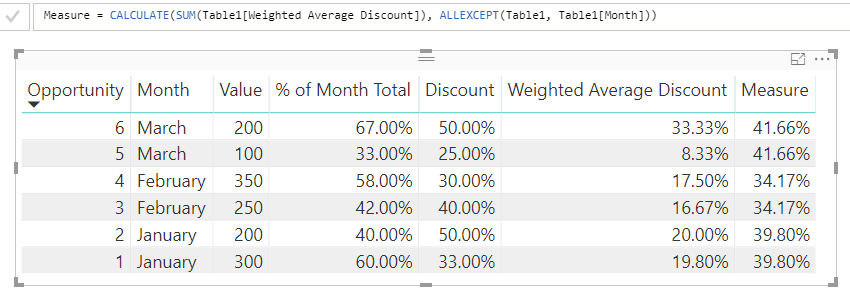
To achieve your requirement, create a measure using measure like below:

Measure = CALCULATE(SUM(Table1[Weighted Average Discount]), ALLEXCEPT(Table1, Table1[Month]))

1.PNG 


Regards,

Jimmy Tao

View solution in original post

2 REPLIES 2
v-yuta-msft
Community Support
Community Support

Hi PaulCo,


To achieve your requirement, create a measure using measure like below:

Measure = CALCULATE(SUM(Table1[Weighted Average Discount]), ALLEXCEPT(Table1, Table1[Month]))

1.PNG 


Regards,

Jimmy Tao

Perfect, thanks.


I had to do a couple of intermediateary steps but I got there with the help of your example.

Helpful resources

Announcements
May Power BI Update Carousel

Power BI Monthly Update - May 2026

Check out the May 2026 Power BI update to learn about new features.

Fabric SQL PBI Data Days

Data Days 2026 coming soon!

Sign up to receive a private message when registration opens and key events begin.

New to Fabric survey Carousel

New to Fabric Survey

If you have recently started exploring Fabric, we'd love to hear how it's going. Your feedback can help with product improvements.

Power BI DataViz World Championships carousel

Power BI DataViz World Championships - June 2026

A new Power BI DataViz World Championship is coming this June! Don't miss out on submitting your entry.