Join us at FabCon Atlanta from March 16 - 20, 2026, for the ultimate Fabric, Power BI, AI and SQL community-led event. Save $200 with code FABCOMM.
Register now!Learn from the best! Meet the four finalists headed to the FINALS of the Power BI Dataviz World Championships! Register now
Hello everyone!
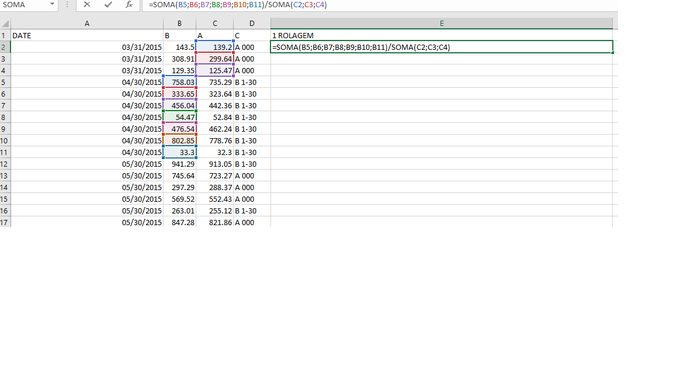
I'm having some trouble with calculating the division of two sums with one month difference between them.
Here's what I want to do: I have two columns, A and B.
MEASURE = SUM(B) / SUM(A) where the month of A is always a month before B
Example:
MEASURE = SUM(B - BEING MONTH = FEBRUARY) / SUM(A - BEING MONTH = JANUARY)
Can someone help me with that?
Thanks!
Solved! Go to Solution.
Hi,
This data is not well structured. Using the Query Editor, we should right click on the Date column and the right column and then unpivot the other columns to convert your dataset into a 4 column one. Once that is done, one can easily use the Date/Time Intelligence functions to get the growth over the previous month/year by writing simple measures.
That's the idea of the calculation:
Hi,
This data is not well structured. Using the Query Editor, we should right click on the Date column and the right column and then unpivot the other columns to convert your dataset into a 4 column one. Once that is done, one can easily use the Date/Time Intelligence functions to get the growth over the previous month/year by writing simple measures.
Hi @bramos88,
Please new a calculated column with below DAX:
SumB/SumA =
IF (
'Table 1'[DATE].[MonthNo] < 12,
CALCULATE (
SUM ( 'Table 1'[B] ),
FILTER (
ALLEXCEPT ( 'Table 1', 'Table 1'[DATE].[Year], 'Table 1'[DATE].[Month] ),
'Table 1'[DATE].[MonthNo]
= EARLIER ( 'Table 1'[DATE].[MonthNo] ) + 1
&& 'Table 1'[DATE].[Year] = EARLIER ( 'Table 1'[DATE].[Year] )
)
),
CALCULATE (
SUM ( 'Table 1'[B] ),
FILTER (
ALLEXCEPT ( 'Table 1', 'Table 1'[DATE].[Year], 'Table 1'[DATE].[Month] ),
'Table 1'[DATE].[MonthNo]
= 1 + 1
&& 'Table 1'[DATE].[Year]
= EARLIER ( 'Table 1'[DATE].[Year] ) + 1
)
)
)
/ CALCULATE (
SUM ( 'Table 1'[A] ),
ALLEXCEPT ( 'Table 1', 'Table 1'[DATE].[Year], 'Table 1'[DATE].[Month] )
)
Best regards,
Yuliana Gu
Hello @v-yulgu-msft
I tried to use that solution but I'm getting some trouble with these parts:
IF (
'Table 1'[DATE].[MonthNo] < 12,Consulta1[DATA_SALDO].[MonthNo] = EARLIER ( Consulta1[DATA_SALDO].[MonthNo] ) + 1
I'm getting the error that is not possible to determine one single value for "year".
Do you know something about it?
Thanks!
Hi @bramos88,
Please provide sample data to illustrate your desired output. If possible, post an image which shows your expected result.
Regards,
Yuliana Gu
Hi,
If columns A and B contain Months or even dates, then how can you add them? Share some data and show the expected result.
Share feedback directly with Fabric product managers, participate in targeted research studies and influence the Fabric roadmap.
Check out the February 2026 Power BI update to learn about new features.
| User | Count |
|---|---|
| 66 | |
| 58 | |
| 45 | |
| 19 | |
| 15 |