This time we’re going bigger than ever. Fabric, Power BI, SQL, AI and more. We're covering it all. You won't want to miss it.
Learn moreDid you hear? There's a new SQL AI Developer certification (DP-800). Start preparing now and be one of the first to get certified. Register now
What is the best way to calculate the mode (central tendency measure) from an unpivoted column of numerical data (e.g., Likert response values) in Power BI?
Thanks,
Russ
Solved! Go to Solution.
@russm perhaps the solution offered on this article.
Mode :=
MINX (
TOPN (
1,
ADDCOLUMNS (
VALUES ( Data[Value] ),
"Frequency", CALCULATE ( COUNT ( Data[Value] ) )
),
[Frequency],
0
),
Data[Value]
)
@russm perhaps the solution offered on this article.
Mode :=
MINX (
TOPN (
1,
ADDCOLUMNS (
VALUES ( Data[Value] ),
"Frequency", CALCULATE ( COUNT ( Data[Value] ) )
),
[Frequency],
0
),
Data[Value]
)
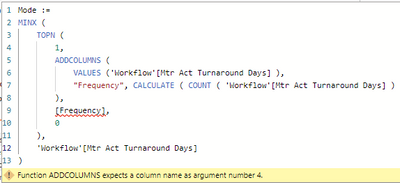
Hi KHorseman, I am new to the Power BI Community forum and not sure if this is correct etiquette or not to reply to this post. Please let me know if not. I found this post in my search to calculate 'Mode'. But when I use the solution, I get an error "Function ADDCOLUMNS expects a column name as argument number 4."
Are you able to shed any light on where I have gone wrong please?
It worked
Thank you very much
Perfect!
Thank you!
Check out the April 2026 Power BI update to learn about new features.
Sign up to receive a private message when registration opens and key events begin.
If you have recently started exploring Fabric, we'd love to hear how it's going. Your feedback can help with product improvements.
| User | Count |
|---|---|
| 34 | |
| 31 | |
| 30 | |
| 21 | |
| 16 |
| User | Count |
|---|---|
| 61 | |
| 50 | |
| 30 | |
| 23 | |
| 23 |