cancel
Showing results for 
Search instead for 
Did you mean: 

The Power BI Data Visualization World Championships is back! Get ahead of the game and start preparing now! Learn more

Reply
russm
Helper I
Helper I

Calculating modes

What is the best way to calculate the mode (central tendency measure) from an unpivoted column of numerical data (e.g., Likert response values) in Power BI?


Thanks,


Russ

1 ACCEPTED SOLUTION
KHorseman
Community Champion
Community Champion

@russm perhaps the solution offered on this article.


Mode :=
MINX (
    TOPN (
        1,
        ADDCOLUMNS (
            VALUES ( Data[Value] ),
            "Frequency", CALCULATE ( COUNT ( Data[Value] ) )
        ),
        [Frequency],
        0
    ),
    Data[Value]
)


Did I answer your question? Mark my post as a solution!

Proud to be a Super User!


View solution in original post

4 REPLIES 4
KHorseman
Community Champion
Community Champion

@russm perhaps the solution offered on this article.


Mode :=
MINX (
    TOPN (
        1,
        ADDCOLUMNS (
            VALUES ( Data[Value] ),
            "Frequency", CALCULATE ( COUNT ( Data[Value] ) )
        ),
        [Frequency],
        0
    ),
    Data[Value]
)


Did I answer your question? Mark my post as a solution!

Proud to be a Super User!


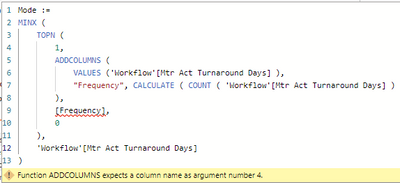
Hi KHorseman, I am new to the Power BI Community forum and not sure if this is correct etiquette or not to reply to this post. Please let me know if not. I found this post in my search to calculate 'Mode'. But when I use the solution, I get an error "Function ADDCOLUMNS expects a column name as argument number 4."

christinek_0-1680053434765.png

Are you able to shed any light on where I have gone wrong please?

Anonymous
Not applicable

It worked


Thank you very much

Perfect!

Thank you!

Helpful resources

Announcements
Power BI DataViz World Championships

Power BI Dataviz World Championships

The Power BI Data Visualization World Championships is back! Get ahead of the game and start preparing now!

December 2025 Power BI Update Carousel

Power BI Monthly Update - December 2025

Check out the December 2025 Power BI Holiday Recap!

FabCon Atlanta 2026 carousel

FabCon Atlanta 2026

Join us at FabCon Atlanta, March 16-20, for the ultimate Fabric, Power BI, AI and SQL community-led event. Save $200 with code FABCOMM.

Top Solution Authors